Your cart
Your cart is empty


6ES7972-0CB20-0XA0:Compatible with Siemens PC Adapter USB Adapter Maximum Rate 1.5Mbps Optical Isolation
$69.95 USD
Please Note, this goods made by us, not original simatic products.
But it can communication with your PLC and HMI.
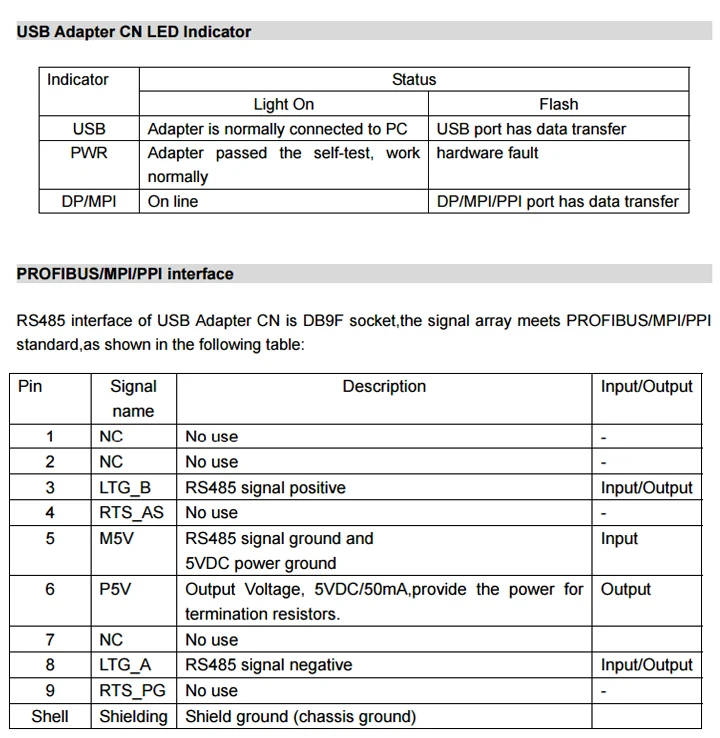
USB Adapter CN is a high-tech adapter similar , support USB of computer to PROFIBUS/MPI/PPI communication, USB Adapter CN adopt power supply from USB port,use the low-power low-voltage chip,even if the USB port power low down to 4V,it still can ensure the stable and reliable work of the adapter. RS485 interface(PROFIBUS/MPI/PPI) of USB Adapter CN is the standard interface as same as the CP5611/CP5512, the 6PIN and 5PIN of DB9F socket output 5VDC power which can supply the power for the termination resistors. Besides it can be used for S7-200/300/400 PLC,it also can be used for HMI,CNC etc other third party equipments,support long distance communication,allowed cable length meet the profibus standard.

Main Technical Specifications:
● Compatible with USB V1.1 and USB V2.0 specifications,connect the USB port of PC to DP/MPI/PPI interface of S7 system. ● Support PROFIBUS/MPI/PPI communication,auto bus protocol test ● You can download the latest software from Siemens website to update the firmware for USB Adapter CN to get the latest function ● Power supply from USB port, power consumption about 150mA,with over current and surge protection ● Opto-isolated voltage 1000VDC. ● USB port has the anti-surging protection ● RS485 interface has the anti-lightning and surging protector, Repeatability surge capacity: Ipp=100A(10/700us,4KV),meet the standard ITU-TK20/21、VDE 0433. ±15KV ESD protection. ● support long distance communication,the largest communication distance meet the profibus standard ● With the power indicator, USB indicator, DP/MPI indicator. ● One PC only support one USB Adapter CN ● Can install the adapter on the S7-300/400PLC rail or 35MM standard rail. ● Overall Size: 123mm×68mm×30mm(Length*Width*Height),with the mounting bracket ● Working Temperature: -20~+75℃

USB Adapter CN installation
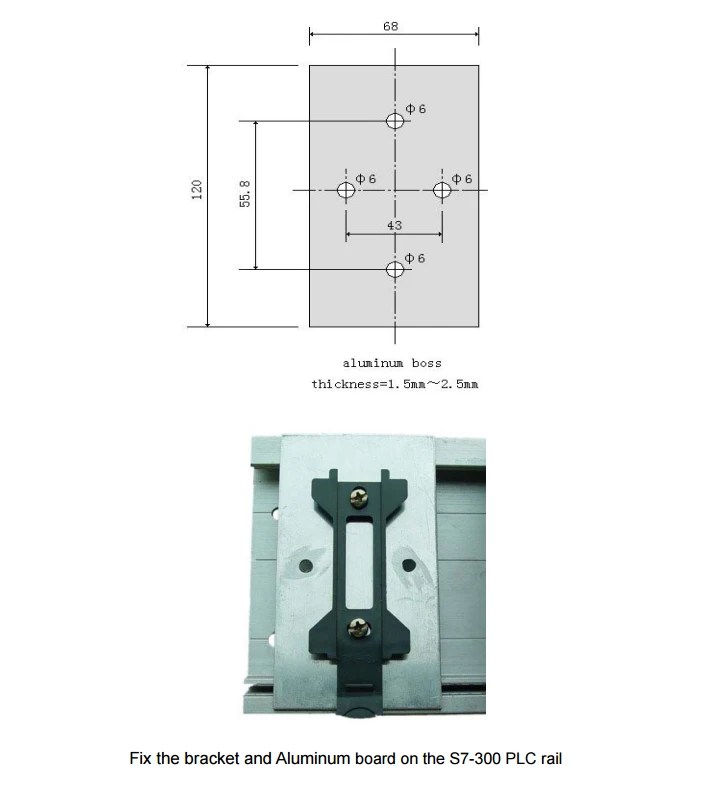
You can put the USB Adapter CN on your desk or install it on the rail of control cabinet.It has the mounting bracket accessory.User can self-make an Aluminum board with thickness 1.5mm~ 2.5mm,then install the adapter on the S7-300/400PLC rail or 35MM standard rail.
PROFIBUS/MPI/PPI interface connection cable
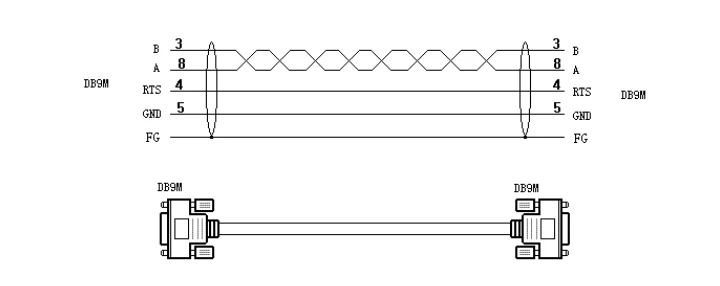
There is a pc of 5 m cable attached with the adapter,it’s used to connect the USB Adapter CN and PLC,correspond to Siemens 6ES7 901-0BF00-0AA0,as shown below:
Long distance communication
USB Adapter CN power is provided by the USB port,voltage is +5VDC±15%,150mA,not from RS485 interface of PLC.Thus the adapter can also be used for the other DP/MPI/PPI interfaces without 24VDC power output.Besides the RS485 interface of USB Adapter CN is as same as Siemens CP5611/CP5512,you can insert the profibus connector to achieve the long distance communication,and provide the power for the termination resistors of profibus connector. Different baud rates allowed the largest communication distance meet the PROFIBUS standard,as shown in the following table:

Product Content
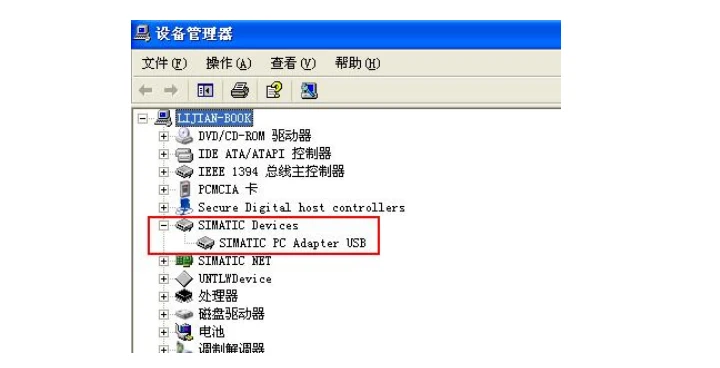
USB Adapter CN 1PC Mounting bracket 1PC USB connection cable 1PC,2M. MPI connection cable 1PC,5M. Driver CD 1PC Operating System requirement The following operating system is required on the PC Windows 2000 Windows XP Professional Windows XP Home Windows Server 2003 Standard Edition Windows Vista Windows 7 You need to install STEP7 software for S7-300/400PLC, STEP7-Micro/WIN software for S7-200PLC when you use USB Adapter CN to communicate.For other devices like HMI,CNC to communicate,it’s also required to install the corresponding application softwares. Start to use USB Adapter CN Install driver After you install STEP7 or STEP7 Micro/WIN etc softwares on the PC,you still need to install the Siemens original PC_Adapter_USB driver, the driver is included in the CD. You also could download the latest version PC_Adapter_USB driver from Siemens website, the link is http://www.ad.siemens.com.cn/download/docList.aspx?TypeId=5&CatFirst=1&PageIndex=4 Check whether the USB Adapter CN can work well after you install the driver,right click”My computer”->Property->hardware->device manager,plug the USB Adapter CN in the USB port of PC,device manager will appear a new device as shown in the following red box,which show the hardware and driver work well.
It will appear the “USB” option in the “local connection” of “set PG/PC interface” in the Step7 software after you finish installing the driver,and then choose this USB option. Set PG/PC interface: Run STEP7 or STEP7 Micro/WIN software,click “Set PG/PC” button and then it will show the following choice list: - PC Adapter (Auto) (This option will be shown only after you install the STEP 7) - PC Adapter (MPI) - PC Adapter (PPI) (This option will be shown only after you install the 7-Micro/WIN) - PC Adapter (PROFIBUS) If it doesn’t show the above list,please click "Select..." button to install or remove the interfaces. Select one interface in the list.click”property”,it will appear “USB” option in the “local connection”,choose this “USB” option and then click “OK”.

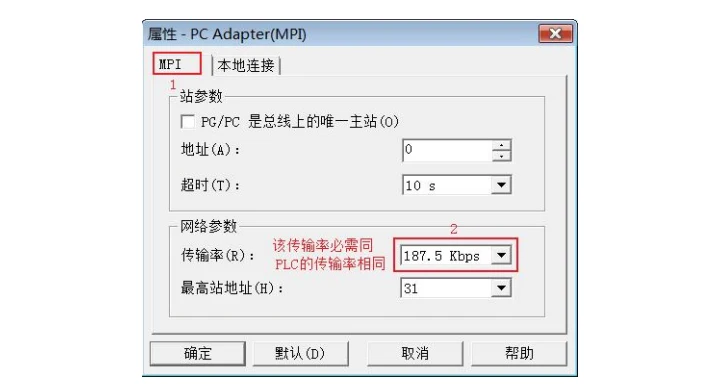
In the next the connection between USB Adapter CN and DP/MPI/PPI interface of PLC is OK,and you could do the downloading,uploading and monitoring operation. STEP7 software setting when it communicates with MPI interface of S7-300/400PLC: Connect USB Adapter CN to MPI interface of S7-300/400CPU. Enter Step7 software main interface(SIMATIC Manager),click “Set PG/PC interface”under “option”menu to enter PG/PC setting interface. 1.Select “PC Adapter(MPI)”, click”property” button to enter MPI interface parameters setting.

2.Click the top “MPI” option,set the adapter MPI interface parameter,choose the baud rate 187.5Kbps or 19.2Kbps or 1.5Mbps,this baud rate must be the same as the PLC MPI interface baud rate.If you don’t know the PLC MPI interface baud rate,you could choose “PC Adapter (Auto)” to check.Other parameters are default,click “OK” button to return the previous menu,click”OK” to return the main interface.
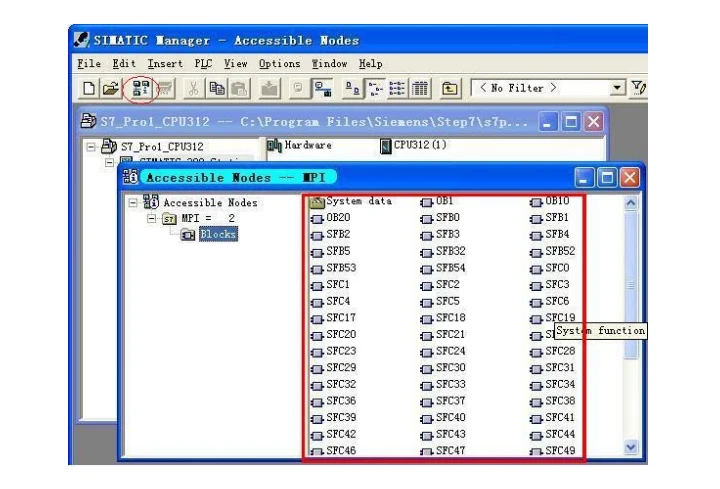
3.Online test: After USB Adapter CN connects MPI interface of S7-300/400PLC and USB port of PC ,then click the red circled button in the main menu as follows and will appear the data in the red marked frame and show the online test is OK. And now all the settings are finished. Now you can go on the work such as program download and upload, monitoring etc.
STEP7 software setting when it communicates with PROFIBUS-DP interface of S7-300/400PLC:
Connect USB Adapter CN to DP interface of S7-300/400CPU. Enter Step7 software main interface(SIMATIC Manager),click “Set PG/PC interface”under “option”menu to enter PG/PC setting interface. 1.Select “PC Adapter(PROFIBUS)”,click”property” button to enter DP interface parameters setting.

2.Click the top “PROFIBUS” option,set the adapter PROFIBUS interface parameter,the baud rate which you choose must be the same as the PLC PROFIBUS interface baud rate.If you don’t know the PLC PROFIBUS interface baud rate,you could choose “PC Adapter(Auto)” to check.Other parameters are default,click “OK” button to return the previous menu,click”OK” to return the main interface.

USB Adapter CN support PROFIBUS-DP/ Standard/ Universal(DP/FMS)/ User-defined 3.Online test: After USB Adapter CN connects DP interface of S7-300/400PLC and USB port of PC ,then click the red circled button in the main menu as follows and will appear the data in the red marked frame and show the online test is OK. And now all the settings are finished. Now you can go on the work such as program download and upload, monitoring etc.

STEP7 software setting when it communicates with S7-300/400PLC using the automatic bus protocol test method:
Whether USB Adapter CN connects the MPI interface or PROFIBUS interface of S7-300/400CPU, you could both use the automatic bus protocol test method to communicate with PLC, this mothod can automatically test the PLC communication protocol and baud rate etc parameters. 1.Select “PC Adapter(Auto)”, click”property” button to enter bus automatic test setting.

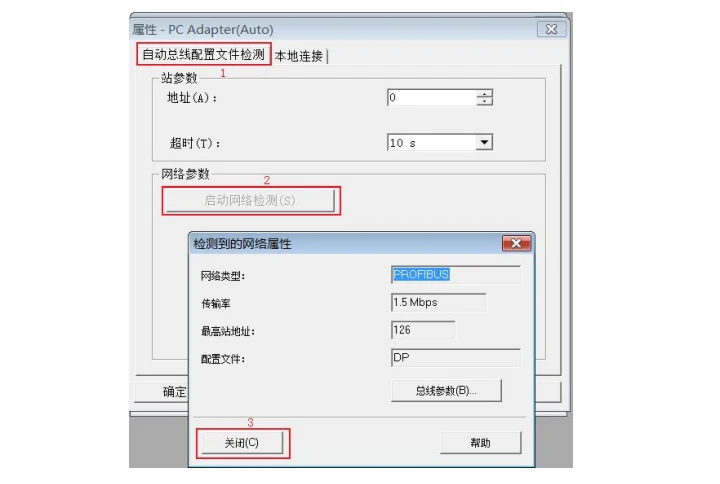
3.Online test: click the red circled button in the main menu as follows and will appear the data in the red marked frame and show the online test is OK. And now all the settings are finished

STEP7 Micro/WIN software setting when it communicates with PPI interface of S7-200PLC: USB Adapter CN can be used for the communication of Siemens S7-200PLC with multi-master PPI and advanced PPI,like CPU22X series PLC. For the earlier CPU21X series PLC,they can’t communicate with USB Adapter CN because they don’t support multi-master PPI and advanced PPI. Connect USB Adapter CN to RS485 interface of S7-200CPU. Enter STEP7 Micro/WIN software main interface,click the lower left corner “Set PG/PC interface” button to enter the PG/PC setting interface. 1.Select “PC Adapter(PPI)”,click”property” button to enter local connection and PPI interface parameters setting.

3.Click the top “PPI” option,set the adapter PPI interface parameter,the baud rate which you choose must be the same as the PLC baud rate.Other parameters are default,click “OK” button to return the previous menu,click”OK” to return the main interface. You can see the parameters are fixed advanced PPI and multi-master PPI,you can’t change.
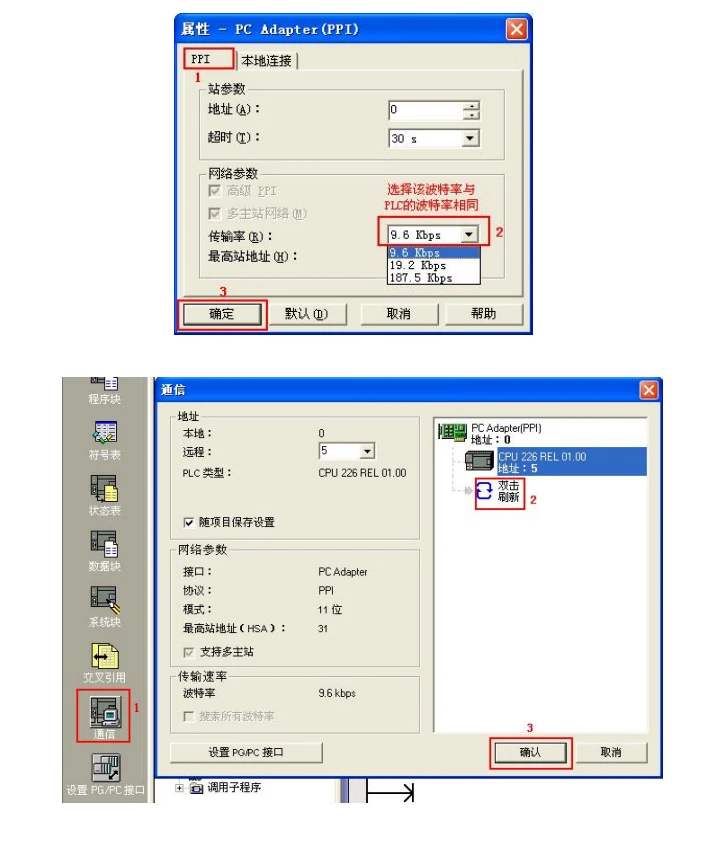
4.Online test: After USB Adapter CN connects RS485 interface of S7-200CPU and USB port of PC, click the “communicate” button in the lower left corner of main interface to enter searching PLC interface, double-click “Double-click Refresh” icon,then you can search out the PLC which is connected with USB Adapter CN, Select the PLC and then click”OK” to return the main interface. Now you can go on the work such as program download and upload, monitoring etc.
New and In stock here !!!


Combo Up Savings Up To $1060+
The more you add, the more you'll save!
NewTouchBuff Official Store
6ES7972-0CB20-0XA0:Compatible with Siemens PC Adapter USB Adapter Maximum Rate 1.5Mbps Optical Isolation
$69.95 USD
Stop Overpaying for Industrial Gear! As a direct supplier, we cut out middlemen to bring you premium industrial control products at unbeatable prices—PLC modules, replacement cables, industrial fans, touch glass, and more. Our industrial-grade products reduce maintenance costs by 30%, minimize downtime by 40%, and last 2x longer than cheap alternatives. Invest once, save for years—choose cost-effective, reliable gear that keeps your factory efficient and your budget in check. Shop now and enjoy the best value for your industrial procurement!
Estimated delivery between September 18 and September 20.
Price Match
We check our prices every day to ensure we can bring you the best price possible. In the unlikely case that you have found a cheaper price then please contact us on sales@seawens.com and we'll do our best to answer your query right away!
Multibuy Discounts
Planning to purchase multiple electrical appliances or household electronics?
We offer exclusive multibuy discounts with customised package pricing when you order two or more products together.
WhatsApp on (+86) 195 2767 5574 or visit our Multibuy Discounts page for full details and to request your tailored quote today.
Finance
We've partnered up with PayPal!
Why use PayPal?
✅ Safe and private, your bank info is well protected
✅ Official buyer protection, safe for your order
✅ Payment arrives instantly, we can ship immediately
✅ Easy to operate, no complicated bank procedures
✅ Much faster and simpler than TT wire transfer
How does it work?
- Add your purchase to cart
- Select PayPal or Credit Card at the checkout
- Complete PayPal application
- Compare any available finance options
Delivery Information
- Shipping TimeOrders will be shipped within 1–3 working days after payment is confirmed. Stock items can be arranged for shipment on the same day.
- Shipping MethodWe use international express such as DHL, FedEx, UPS, TNT and EMS.For bulk orders, we also support air freight and sea freight.
- Delivery Time
- International Express: About 3–7 working days to most countries
- Air Freight: About 7–15 working days
- Sea Freight: About 25–45 working days (depends on destination port)
- Tracking NumberOnce dispatched, we will send you the tracking number and shipping link immediately. You can check the shipment status online anytime.
- PackagingAll products are packed with anti-static bag, foam box and carton.Professional shockproof and moisture-proof packaging to ensure goods arrive in good condition.
- Customs & DutiesThe import tax and customs duty are borne by the buyer.We can declare a reasonable value to help you reduce customs tax.
- Delivery AddressPlease confirm your full delivery address, postcode and contact phone number correctly. We are not responsible for delivery delay caused by wrong address.
Flexible Delivery
We know that you expect your goods to be delivered promptly and efficiently. That’s why we have made it a priority at NewTouchBuff.com to deliver your goods as quickly as possible using our fast, efficient delivery service which comes direct to your home and is FREE for most items!
- We deliver seven days a week
- Standard deliveries are despatched via specialist carriers and are normally delivered within 3-5 working days.
- Express deliveries are dispatched same day (if ordered before 14:30) for delivery within 1-2 working days.
- For weekend deliveries, orders need to be placed by 14:30 on Friday.
- Larger Items are despatched using our team of specialist nationwide carriers. You will be contacted within 48 hours verifying your order and an estimated delivery date.
- Deliveries direct from manufacturers or suppliers can take a little longer but we will keep you informed and updated.
$69.95 USD
$69.95 USD
Focus on Reliability & Efficiency
Your Industrial Production Deserves the Best—Don’t Settle for Less!
Highly Stimulating
Hurry Up! Limited Stock Alert for Industrial Control Essentials!
Please Note, this goods made by us, not original simatic products.
But it can communication with your PLC and HMI.
USB Adapter CN is a high-tech adapter similar , support USB of computer to PROFIBUS/MPI/PPI communication, USB Adapter CN adopt power supply from USB port,use the low-power low-voltage chip,even if the USB port power low down to 4V,it still can ensure the stable and reliable work of the adapter. RS485 interface(PROFIBUS/MPI/PPI) of USB Adapter CN is the standard interface as same as the CP5611/CP5512, the 6PIN and 5PIN of DB9F socket output 5VDC power which can supply the power for the termination resistors. Besides it can be used for S7-200/300/400 PLC,it also can be used for HMI,CNC etc other third party equipments,support long distance communication,allowed cable length meet the profibus standard.
Main Technical Specifications:
● Compatible with USB V1.1 and USB V2.0 specifications,connect the USB port of PC to DP/MPI/PPI interface of S7 system. ● Support PROFIBUS/MPI/PPI communication,auto bus protocol test ● You can download the latest software from Siemens website to update the firmware for USB Adapter CN to get the latest function ● Power supply from USB port, power consumption about 150mA,with over current and surge protection ● Opto-isolated voltage 1000VDC. ● USB port has the anti-surging protection ● RS485 interface has the anti-lightning and surging protector, Repeatability surge capacity: Ipp=100A(10/700us,4KV),meet the standard ITU-TK20/21、VDE 0433. ±15KV ESD protection. ● support long distance communication,the largest communication distance meet the profibus standard ● With the power indicator, USB indicator, DP/MPI indicator. ● One PC only support one USB Adapter CN ● Can install the adapter on the S7-300/400PLC rail or 35MM standard rail. ● Overall Size: 123mm×68mm×30mm(Length*Width*Height),with the mounting bracket ● Working Temperature: -20~+75℃
USB Adapter CN installation
You can put the USB Adapter CN on your desk or install it on the rail of control cabinet.It has the mounting bracket accessory.User can self-make an Aluminum board with thickness 1.5mm~ 2.5mm,then install the adapter on the S7-300/400PLC rail or 35MM standard rail.
PROFIBUS/MPI/PPI interface connection cable
There is a pc of 5 m cable attached with the adapter,it’s used to connect the USB Adapter CN and PLC,correspond to Siemens 6ES7 901-0BF00-0AA0,as shown below:
Long distance communication
USB Adapter CN power is provided by the USB port,voltage is +5VDC±15%,150mA,not from RS485 interface of PLC.Thus the adapter can also be used for the other DP/MPI/PPI interfaces without 24VDC power output.Besides the RS485 interface of USB Adapter CN is as same as Siemens CP5611/CP5512,you can insert the profibus connector to achieve the long distance communication,and provide the power for the termination resistors of profibus connector. Different baud rates allowed the largest communication distance meet the PROFIBUS standard,as shown in the following table:
Product Content
USB Adapter CN 1PC Mounting bracket 1PC USB connection cable 1PC,2M. MPI connection cable 1PC,5M. Driver CD 1PC Operating System requirement The following operating system is required on the PC Windows 2000 Windows XP Professional Windows XP Home Windows Server 2003 Standard Edition Windows Vista Windows 7 You need to install STEP7 software for S7-300/400PLC, STEP7-Micro/WIN software for S7-200PLC when you use USB Adapter CN to communicate.For other devices like HMI,CNC to communicate,it’s also required to install the corresponding application softwares. Start to use USB Adapter CN Install driver After you install STEP7 or STEP7 Micro/WIN etc softwares on the PC,you still need to install the Siemens original PC_Adapter_USB driver, the driver is included in the CD. You also could download the latest version PC_Adapter_USB driver from Siemens website, the link is http://www.ad.siemens.com.cn/download/docList.aspx?TypeId=5&CatFirst=1&PageIndex=4 Check whether the USB Adapter CN can work well after you install the driver,right click”My computer”->Property->hardware->device manager,plug the USB Adapter CN in the USB port of PC,device manager will appear a new device as shown in the following red box,which show the hardware and driver work well.
It will appear the “USB” option in the “local connection” of “set PG/PC interface” in the Step7 software after you finish installing the driver,and then choose this USB option. Set PG/PC interface: Run STEP7 or STEP7 Micro/WIN software,click “Set PG/PC” button and then it will show the following choice list: - PC Adapter (Auto) (This option will be shown only after you install the STEP 7) - PC Adapter (MPI) - PC Adapter (PPI) (This option will be shown only after you install the 7-Micro/WIN) - PC Adapter (PROFIBUS) If it doesn’t show the above list,please click "Select..." button to install or remove the interfaces. Select one interface in the list.click”property”,it will appear “USB” option in the “local connection”,choose this “USB” option and then click “OK”.
In the next the connection between USB Adapter CN and DP/MPI/PPI interface of PLC is OK,and you could do the downloading,uploading and monitoring operation. STEP7 software setting when it communicates with MPI interface of S7-300/400PLC: Connect USB Adapter CN to MPI interface of S7-300/400CPU. Enter Step7 software main interface(SIMATIC Manager),click “Set PG/PC interface”under “option”menu to enter PG/PC setting interface. 1.Select “PC Adapter(MPI)”, click”property” button to enter MPI interface parameters setting.
2.Click the top “MPI” option,set the adapter MPI interface parameter,choose the baud rate 187.5Kbps or 19.2Kbps or 1.5Mbps,this baud rate must be the same as the PLC MPI interface baud rate.If you don’t know the PLC MPI interface baud rate,you could choose “PC Adapter (Auto)” to check.Other parameters are default,click “OK” button to return the previous menu,click”OK” to return the main interface.
3.Online test: After USB Adapter CN connects MPI interface of S7-300/400PLC and USB port of PC ,then click the red circled button in the main menu as follows and will appear the data in the red marked frame and show the online test is OK. And now all the settings are finished. Now you can go on the work such as program download and upload, monitoring etc.
STEP7 software setting when it communicates with PROFIBUS-DP interface of S7-300/400PLC:
Connect USB Adapter CN to DP interface of S7-300/400CPU. Enter Step7 software main interface(SIMATIC Manager),click “Set PG/PC interface”under “option”menu to enter PG/PC setting interface. 1.Select “PC Adapter(PROFIBUS)”,click”property” button to enter DP interface parameters setting.
2.Click the top “PROFIBUS” option,set the adapter PROFIBUS interface parameter,the baud rate which you choose must be the same as the PLC PROFIBUS interface baud rate.If you don’t know the PLC PROFIBUS interface baud rate,you could choose “PC Adapter(Auto)” to check.Other parameters are default,click “OK” button to return the previous menu,click”OK” to return the main interface.
USB Adapter CN support PROFIBUS-DP/ Standard/ Universal(DP/FMS)/ User-defined 3.Online test: After USB Adapter CN connects DP interface of S7-300/400PLC and USB port of PC ,then click the red circled button in the main menu as follows and will appear the data in the red marked frame and show the online test is OK. And now all the settings are finished. Now you can go on the work such as program download and upload, monitoring etc.
STEP7 software setting when it communicates with S7-300/400PLC using the automatic bus protocol test method:
Whether USB Adapter CN connects the MPI interface or PROFIBUS interface of S7-300/400CPU, you could both use the automatic bus protocol test method to communicate with PLC, this mothod can automatically test the PLC communication protocol and baud rate etc parameters. 1.Select “PC Adapter(Auto)”, click”property” button to enter bus automatic test setting.
3.Online test: click the red circled button in the main menu as follows and will appear the data in the red marked frame and show the online test is OK. And now all the settings are finished
STEP7 Micro/WIN software setting when it communicates with PPI interface of S7-200PLC: USB Adapter CN can be used for the communication of Siemens S7-200PLC with multi-master PPI and advanced PPI,like CPU22X series PLC. For the earlier CPU21X series PLC,they can’t communicate with USB Adapter CN because they don’t support multi-master PPI and advanced PPI. Connect USB Adapter CN to RS485 interface of S7-200CPU. Enter STEP7 Micro/WIN software main interface,click the lower left corner “Set PG/PC interface” button to enter the PG/PC setting interface. 1.Select “PC Adapter(PPI)”,click”property” button to enter local connection and PPI interface parameters setting.
3.Click the top “PPI” option,set the adapter PPI interface parameter,the baud rate which you choose must be the same as the PLC baud rate.Other parameters are default,click “OK” button to return the previous menu,click”OK” to return the main interface. You can see the parameters are fixed advanced PPI and multi-master PPI,you can’t change.
4.Online test: After USB Adapter CN connects RS485 interface of S7-200CPU and USB port of PC, click the “communicate” button in the lower left corner of main interface to enter searching PLC interface, double-click “Double-click Refresh” icon,then you can search out the PLC which is connected with USB Adapter CN, Select the PLC and then click”OK” to return the main interface. Now you can go on the work such as program download and upload, monitoring etc.
New and In stock here !!!
Authencity Guaranteed
We only sell authentic products from verified brand partners and retail partners globally.
Maintenance, Repair And Replacement


$750.00 USD
Receives in 5 days.


$250.95 USD
Receives in 5 days.

$449.95 USD
Receives in 5 days.


$179.95 USD
Receives in 5 days.


$189.95 USD
Receives in 5 days.


$204.95 USD
Receives in 5 days.


$229.95 USD
Receives in 5 days.


$219.95 USD
Receives in 5 days.


Receives in 5 days.


$109.95 USD
Receives in 5 days.


Receives in 5 days.


Receives in 5 days.


- Choosing a selection results in a full page refresh.
- Opens in a new window.