あなたのカート
カートは空です


HOT SALES! USB-1747-CP3:USB adapter for AB SLC 5/03,5/04,5/05 PLC, Fast Shipping
$18.95 USD

USB interface ALLEN BRADLEY SLC 5/03,5/04,5/05 PLC programming adapter
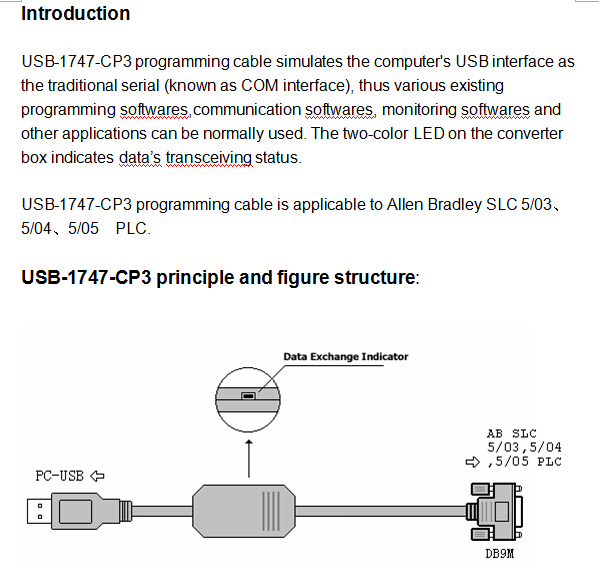
Functions
1.Support USB-1747-CP3 operating system: Windows2000/XP (WinNT4/95/98/Me/DOS not included)
2.support USB-1747-CP3 programming software version:RS Logix 500 and above
3.fully compatible with USB 2.0 standard
4.USB bus-powered, the current consumption of about 50 mA
5.each PC only supports a USB cable programming
6.temperature: -20 ~ +75
7.Cable length: three meters, colors: black
System requirement
Please make sure your PC is IBM PC compatible and has the following system requirements before using the USB programming cable.
1.Intel is compatible with 586DX4-100MHz CPU or higher
2.A standard USB port (4-pin A plug)
3.Operating system is Windows2000 or Windows XP
The setting of driver procedure
Please set the driver procedure according to the following steps:
1. Turning on PC power that will connect the USB programming cable and make sure the USB port working well.
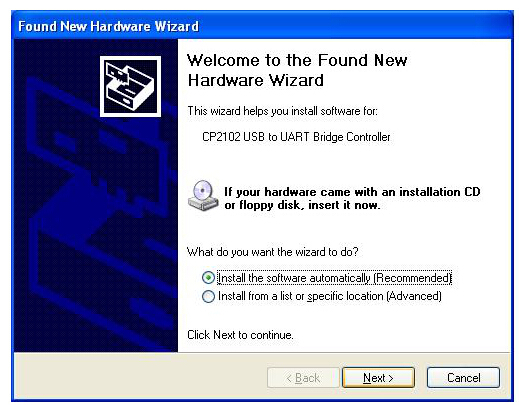
2. Put the USB programming cable into USB port and Windows will detect the device and help to add new hardware and jump to new device setting. Insert the driver CD and click “next” to continue, or select the driver on the hard disk.
If Windows does not show “Found New Hardware Wizard”, please click “Universal Serial bus controllers” in the hardware list of device manager, and choose the USB device with question mark. Click the right key of mouse and operate to update driver procedure.
If insert the driver CD,you should select the recommended item and click “Next”
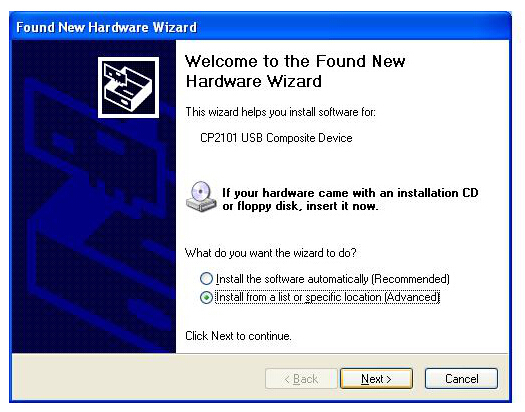
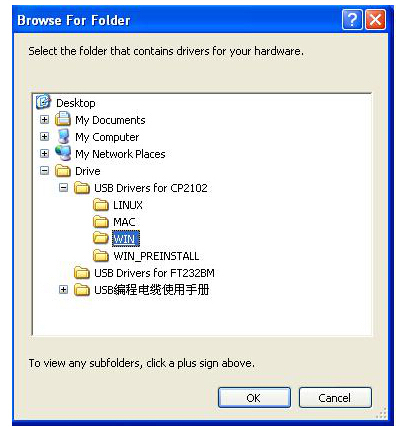
If the driver is saved on the hard disk, you should select the second item and click “Next”. You can find the driver on the “WIN” folder.
3. Windows will detect the setting information, and load the driver to install.
4. Continue to set up, copy the driver procedure files to your hard disk by Windows.
5. When Windows appears “Completing the Found New Hardware Wizard”, click “finish” to end setting up.

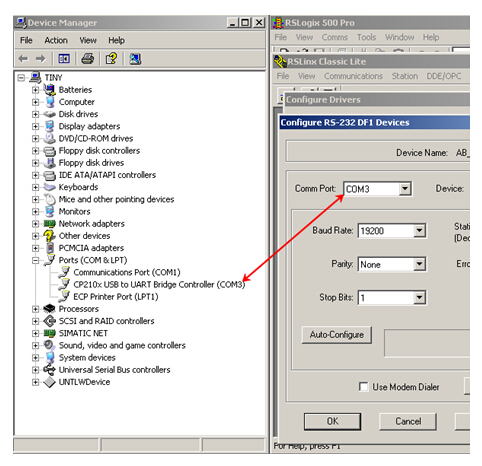
6. After setting up, please make sure the "port (COM and LPT)" of "Start \ Settings \ Control Panel \ system \ hardware \ Device Manager" appears "CP2101 USB to UART Bridge Controller(COMx)". This COMx is the COM message of the USB programming cable. From then on, as long as you insert the programming cable, the COM port will appear. You just have to choose this COM port in application software such as programming software or communication software.
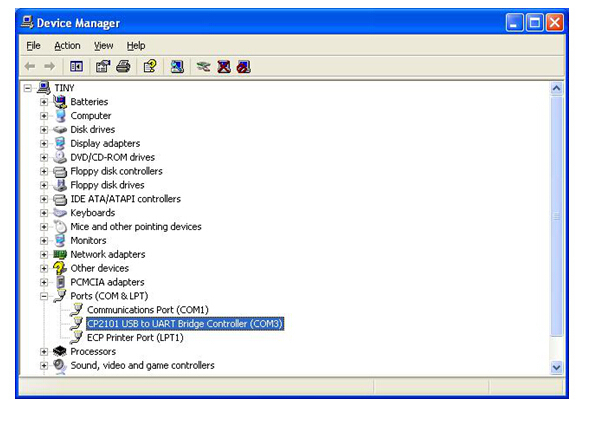
The deletion of driver procedure
Deleting driver procedure is to discharge source of COM port so that other device can be used. When driver procedure has error, it should be deleted and reset up. Please delete the driver procedure as follows:
1. Unplug the USB programming cable from you PC.
2. Choose “USB Serial Converter Drivers”from "Add or Delete Programs” in operation panel, and click the “Change/Remove” button. 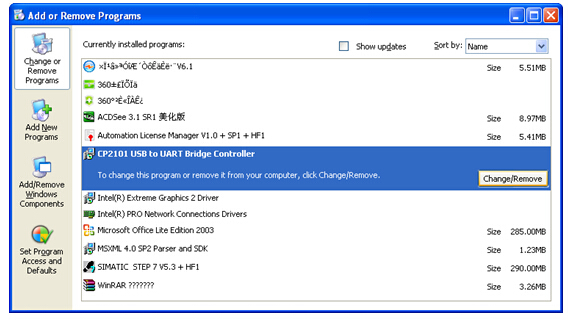
How to change COM setting
1. Delete the driver procedure of all USB to UART products to discharge COM port source, and reset up USB programming cable driver procedure. The device manager will display the cable address COM3.
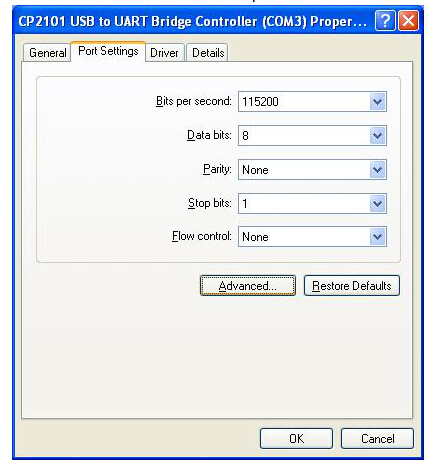
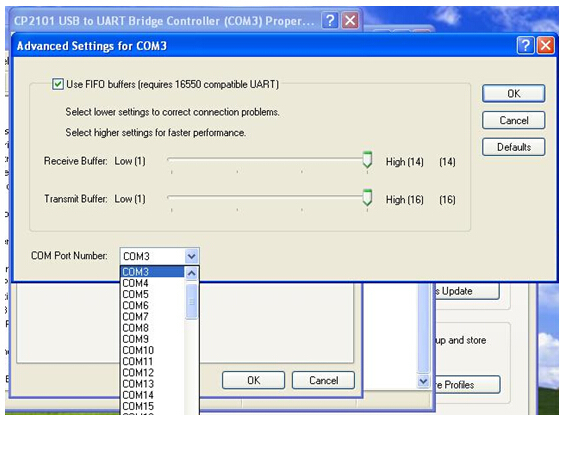
2. In Windows 2000/XP the COM slogan can be changed directly. Please double click COM port device that is need changing in the device manager, and the device attribute information window will appear. Choose “port setting” as the picture shows. Click "Advanced" button, and the advanced setting information window will appear. Set the COM port to the serial number you want and click "OK" button to complete.
Setting of RSLogix
After completing Driver installation, the corresponding COM port for the USB-1747-CP3 programming cable will be displayed in the “Device Manager” of Window. The step next is just to choose this COM port in the programming software and other application software and keep other communication parameters as in the Default settings. And the following steps are exactly the same as in the traditional programming cables with RS232 interfaces.
Notes and Troubleshoot
1. If the USB programming cable could not be detected when opening the PC, or some other outstanding issues occur, please replug it again.
2. USB to UART is plug and play USB device. When data are being transmitted, please don’t disconnect it.
1. Sometimes when Windows System failures or outstanding issues when plug or unplug the USB cable occur, please restart the computer and PLC.
2. If the COM port with “*” symbol in the software,such as “*COM3”,it indicates this COM port is at fault,pls exit programming software and then replug the USB port or reinstall the USB driver.
Rejection provision
This document is to provide information, and the contents will not be noticed when revising. Because of the direct or indirect loss or errors caused by revised document, will not be the responsibility of the manufacturer.
コンボアップ 最大$1060以上節約
追加すればするほどお得になります!
NewTouchBuff Official Store
HOT SALES! USB-1747-CP3:USB adapter for AB SLC 5/03,5/04,5/05 PLC, Fast Shipping
$18.95 USD
Stop Overpaying for Industrial Gear! As a direct supplier, we cut out middlemen to bring you premium industrial control products at unbeatable prices—PLC modules, replacement cables, industrial fans, touch glass, and more. Our industrial-grade products reduce maintenance costs by 30%, minimize downtime by 40%, and last 2x longer than cheap alternatives. Invest once, save for years—choose cost-effective, reliable gear that keeps your factory efficient and your budget in check. Shop now and enjoy the best value for your industrial procurement!
おおよその配送期間は9月 02 から 9月 04の間です。
プライスマッチ
私たちは毎日価格を確認し、お客様に可能な限り最良の価格を提供できるよう努めています。極めて稀なケースですが、より安い価格を見つけた場合はsales@seawens.com までご連絡ください。最善を尽くしてすぐにご質問にお応えします!
まとめ買い割引
複数の電化製品や家庭用電子機器をお買い求めになる予定ですか?
2点以上の商品をまとめてご注文いただくと、特別なまとめ買い割引とカスタマイズされたパッケージ価格をご提供しています。
WhatsAppで (+86) 195 2767 5574 にお問い合わせいただくか、私たちの まとめ買い割引ページ で詳細をご確認いただき、本日でもテーラーメイドの見積もりをリクエストすることができます。
金融
ペイパルと提携しました!
ペイパルを利用する理由は?
✅安全でプライベートな環境で、銀行口座情報がしっかり保護されます
✅公式の購入者保護制度が適用され、注文が安全に守られます
✅入金が即時に行われるため、すぐに商品を発送できます
✅操作が簡単で、面倒な銀行手続きが不要です
✅TT電信送金よりもずっと速くて簡単です
仕組みはどうなっていますか?
- 商品をカートに追加する
- チェックアウト時にペイパルまたはクレジットカードを選択する
- ペイパルの手続きを完了する
- 利用可能なローンプランを比較する
配送情報
- 配送時間入金確認後、1–3営業日以内に発送いたします。在庫品は当日発送も可能です。
- 配送方法DHL、FedEx、UPS、TNT、EMSなどの国際エクスプレスを使用しています。大量注文の場合は、航空輸送と海上輸送にも対応しています。
- 配送期間
- 国際エクスプレス:ほとんどの国へ3–7営業日程度
- 航空輸送:7–15営業日程度
- 海上輸送:25–45営業日程度(発着港により異なります)
- 追跡番号発送後、すぐに追跡番号と配送リンクを送信します。いつでもオンラインで配送状況を確認できます。
- 梱包すべての商品は静電気防止袋、発泡箱、段ボールで梱包しています。専門的な耐衝撃・防湿包装で、商品が無事に到着するようにしています。
- 関税・輸入税輸入税および関税は買い手負担となります。関税を削減できるよう、適正な申告価格を設定できます。
- 配送先住所配送先の完全な住所、郵便番号、連絡先電話番号を正しくご確認ください。住所の誤りによる配送遅延については責任を負いかねます。
柔軟な配送
お客様には商品を迅速かつ効率的にお届けすることをお求めいただいていることを承知しております。そのため、NewTouchBuff.comでは、ご自宅まで直接お届けする高速かつ効率的な配送サービスを利用して可能な限り迅速に商品をお届けすることを最優先にしております。また、ほとんどの商品について配送料は無料です!
- 週7日、毎日配達を行っています
- 通常配送は専門業者を通じて発送され、通常3~5営業日以内にお届けします。
- お急ぎ便の場合、14:30以前に注文いただければその日発送し、1~2営業日以内にお届けします。
- 週末配達をご希望の場合は、金曜日14:30までに注文を手続きいただく必要があります。
- 大型商品は、全国対応の専門業者チームを使用して発送します。注文の確認と配送予定日について、48時間以内にご連絡いたします。
- メーカーやサプライヤーから直接発送する商品は、少しお時間がかかる場合がありますが、随時状況をご連絡いたします。
$18.95 USD
$18.95 USD
Focus on Reliability & Efficiency
Your Industrial Production Deserves the Best—Don’t Settle for Less!
Highly Stimulating
Hurry Up! Limited Stock Alert for Industrial Control Essentials!
USB interface ALLEN BRADLEY SLC 5/03,5/04,5/05 PLC programming adapter
Functions
1.Support USB-1747-CP3 operating system: Windows2000/XP (WinNT4/95/98/Me/DOS not included)
2.support USB-1747-CP3 programming software version:RS Logix 500 and above
3.fully compatible with USB 2.0 standard
4.USB bus-powered, the current consumption of about 50 mA
5.each PC only supports a USB cable programming
6.temperature: -20 ~ +75
7.Cable length: three meters, colors: black
System requirement
Please make sure your PC is IBM PC compatible and has the following system requirements before using the USB programming cable.
1.Intel is compatible with 586DX4-100MHz CPU or higher
2.A standard USB port (4-pin A plug)
3.Operating system is Windows2000 or Windows XP
The setting of driver procedure
Please set the driver procedure according to the following steps:
1. Turning on PC power that will connect the USB programming cable and make sure the USB port working well.
2. Put the USB programming cable into USB port and Windows will detect the device and help to add new hardware and jump to new device setting. Insert the driver CD and click “next” to continue, or select the driver on the hard disk.
If Windows does not show “Found New Hardware Wizard”, please click “Universal Serial bus controllers” in the hardware list of device manager, and choose the USB device with question mark. Click the right key of mouse and operate to update driver procedure.
If insert the driver CD,you should select the recommended item and click “Next”
If the driver is saved on the hard disk, you should select the second item and click “Next”. You can find the driver on the “WIN” folder.
3. Windows will detect the setting information, and load the driver to install.
4. Continue to set up, copy the driver procedure files to your hard disk by Windows.
5. When Windows appears “Completing the Found New Hardware Wizard”, click “finish” to end setting up.
6. After setting up, please make sure the "port (COM and LPT)" of "Start \ Settings \ Control Panel \ system \ hardware \ Device Manager" appears "CP2101 USB to UART Bridge Controller(COMx)". This COMx is the COM message of the USB programming cable. From then on, as long as you insert the programming cable, the COM port will appear. You just have to choose this COM port in application software such as programming software or communication software.
The deletion of driver procedure
Deleting driver procedure is to discharge source of COM port so that other device can be used. When driver procedure has error, it should be deleted and reset up. Please delete the driver procedure as follows:
1. Unplug the USB programming cable from you PC.
2. Choose “USB Serial Converter Drivers”from "Add or Delete Programs” in operation panel, and click the “Change/Remove” button.
How to change COM setting
1. Delete the driver procedure of all USB to UART products to discharge COM port source, and reset up USB programming cable driver procedure. The device manager will display the cable address COM3.
2. In Windows 2000/XP the COM slogan can be changed directly. Please double click COM port device that is need changing in the device manager, and the device attribute information window will appear. Choose “port setting” as the picture shows. Click "Advanced" button, and the advanced setting information window will appear. Set the COM port to the serial number you want and click "OK" button to complete.
Setting of RSLogix
After completing Driver installation, the corresponding COM port for the USB-1747-CP3 programming cable will be displayed in the “Device Manager” of Window. The step next is just to choose this COM port in the programming software and other application software and keep other communication parameters as in the Default settings. And the following steps are exactly the same as in the traditional programming cables with RS232 interfaces.
Notes and Troubleshoot
1. If the USB programming cable could not be detected when opening the PC, or some other outstanding issues occur, please replug it again.
2. USB to UART is plug and play USB device. When data are being transmitted, please don’t disconnect it.
1. Sometimes when Windows System failures or outstanding issues when plug or unplug the USB cable occur, please restart the computer and PLC.
2. If the COM port with “*” symbol in the software,such as “*COM3”,it indicates this COM port is at fault,pls exit programming software and then replug the USB port or reinstall the USB driver.
Rejection provision
This document is to provide information, and the contents will not be noticed when revising. Because of the direct or indirect loss or errors caused by revised document, will not be the responsibility of the manufacturer.
正規品保証
当店では世界中の認定ブランドパートナーと正規小売パートナーから真正品のみを販売しています。
保守、修理、交換


$750.00 USD
Receives in 6 days.


$250.95 USD
Receives in 6 days.

$449.95 USD
Receives in 6 days.


$179.95 USD
Receives in 6 days.


$189.95 USD
Receives in 6 days.


$204.95 USD
Receives in 6 days.


$229.95 USD
Receives in 6 days.


$219.95 USD
Receives in 6 days.


Receives in 6 days.


$109.95 USD
Receives in 6 days.


Receives in 6 days.


Receives in 6 days.


- 選択するとページが完全に更新されます。
- 新しいウィンドウで開きます。