Your cart
Your cart is empty


Compatible with Siemens PC Adapter and HMI Adapter compatible with high-end adapter RS232-RS485-power three-terminal, In Stock
$69.95 USD
PC Adapter CN is a high-tech adapter compatible with Siemens PC Adapter and HMI Adapter,fully support RS232 serial port of PC and HMI to PROFIBUS/MPI communication, adopt the Siemens protocol processor chip,no functional defects. PC Adapter CN is the opto-isolated adapter for industrial design.It has the surge protection and anti-lightning protection circuit on the RS232 interface and RS485 interface, support hot plug, is suitable for Siemens S7-300/400 series PLC and other equipments with PROFIBUS/MPI interface. In particular, it applies to the strong interfere industrial situations and the safeguard in the circuit guarantees the safely running of the system. PC Adapter CN can communicate between S7-300/400PLC and RS232 interface of third party HMI,can replace the Siemens HMI Adapter. The low version PC/MPI+ didn’t adopt the Siemens protocol processor chip,but adopt the MCU and use the software to achieve the profibus protocol,the protocol is not perfect and has the defect,only support MPI communication,not support profibus communication,can only connect few HMI and have the defect. When there are many nodes or third-party device in the network,it can’t identify every node. At the same time, it may have the risk that PC/MPI+ can’t be used after the PLC internal program is upgraded in the future. The network type and baud rate which PC Adapter CN supports:
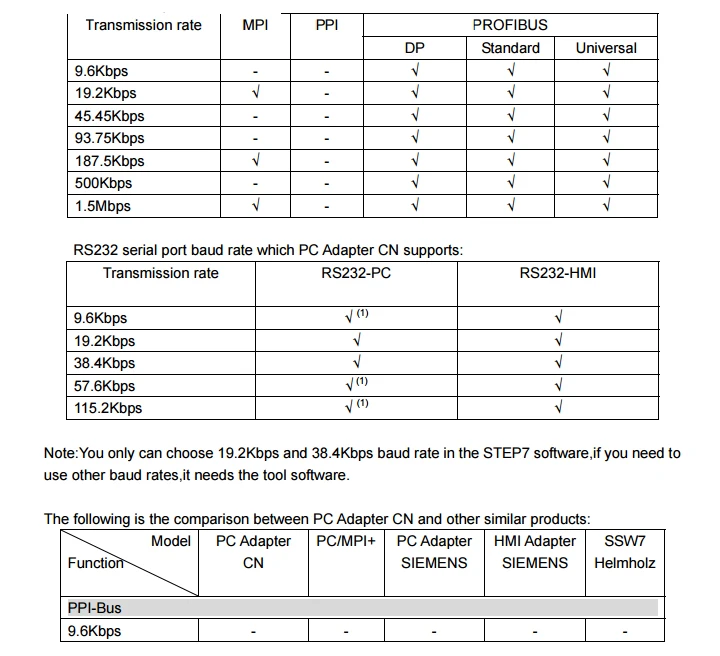

Main Technical Specifications:
● RS232 interface can connect PC or HMI etc third party devices,baud rate 9.6Kbps~ 115.2Kbps automatically adjust. ● Support PROFIBUS and MPI communication, auto bus protocol test,largest baud rate 1.5Mbps. ● Power supply from PLC port,24VDC, Power Consumption 2W,with over current and surge protection. ● Power-RS485-RS232 all isolated ● Opto-isolated voltage 1000VDC. ● RS232 interface has the anti-surging protection ● RS485 interface has the anti-lightning and surging protector, Repeatability surge capacity: Ipp=100A(10/700us,4KV),meet the standard ITU-TK20/21、VDE 0433. ±15KV ESD protection. ● Need additional 24VDC power for the long distance communication, the largest cable length meets the profibus standard. ● With the power indicator, data sending indicator, data receiving indicator Can install the adapter on the S7-300/400PLC rail or 35MM standard rail. ● Shape Size: 123mm×68mm×30mm(Length*Width*Height),with the mounting bracket ● Working Temperature: -20~+75℃

Why the 24V power, RS232 and RS485 three parties all need to be isolated?That’s because the 7 pin and 2 pin(output 24VDC power) and RS485 interface(DB9F socket 3、4、5、6、8、9pin) on the PLC PROFIBUS socket are isolated,if the adapter is not isolated,it will damage the PLC isolation system,then damage the PLC or cause interference.
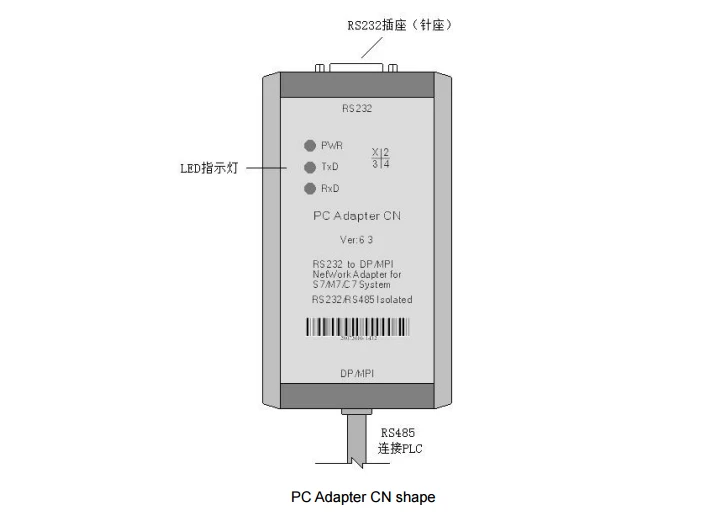
PC Adapter CN installation
You can put the PC Adapter CN on your desk or install it on the rail of control cabinet.It has the mounting bracket accessory.User can self-make an Aluminum board with thickness 1.5mm~ 2.5mm,then install the adapter on the S7-300/400PLC rail or 35MM standard rail.


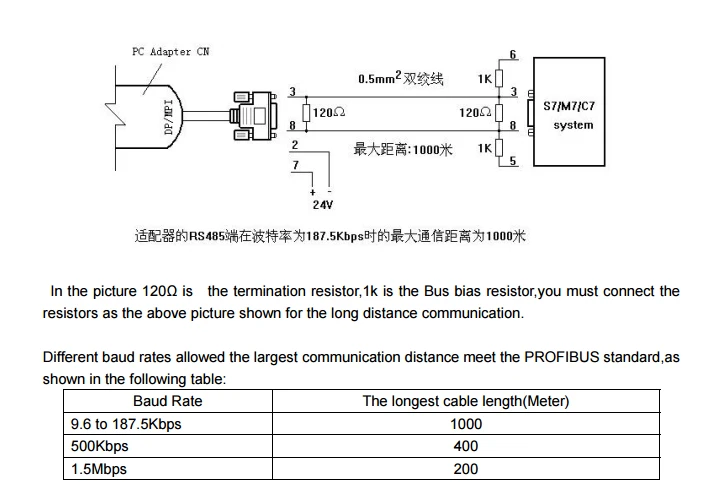
Use the RS232 cable which is attached to the PC Adapter CN to connect the PC Adapter CN and RS232 interface of PC.When you want to connect HMI,user may need to self-make a different RS232 cable according to the HMI user manual of different manufactuers. Extend the communication distance of RS485 interface You need to add a 24VDC power between 7 pin and 2 pin of RS485 interface and connect a termination resistor between 3 pin and 8 pin of RS485 signal for the PC Adapter CN RS485 interface long distance communication.
Product content PC Adapter CN 1PC Mounting bracket 1PC RS232 CABLE, 1PC,5M. Product Manual 1PC Operating System requirement The following operating system is required on the PC Windows 2000 Windows XP Professional Windows XP Home Windows Server 2003 Standard Edition Windows Vista Windows 7 The Usage of PC Adapter CN: Set PG/PC interface: Run STEP7 software,click “Set PG/PC interface” button and will show the following list: - PC Adapter (Auto) - PC Adapter (MPI) - PC Adapter (PROFIBUS) If the above list is not shown,then click "Select..." button to install or remove the interfaces. Select one of interfaces in the list,click” Property”button,Choose the COM port in the “local connection”,transmission rate 19200bps and 38400bps is both OK. PC Adapter CN will automatically adjust the choosed baud rate.Then click “OK”.When you choose the different interfaces in the list,you all choose the COM port in the “local connection”.

If you need to use other baud rate except 19.2K and 38.4K,you need to install a tool software,please consult the manufacturer. STEP7 software setting when it communicates with MPI interface of S7-300/400PLC: Connect PC Adapter CN to MPI interface of S7-300/400CPU. Enter Step7 software main interface(SIMATIC Manager),click “Set PG/PC interface”under “option”menu to enter PG/PC setting interface. 1.Select “PC Adapter(MPI)”,click”property” button to enter MPI interface parameters setting.

1.Click the top “MPI” option,set the adapter MPI interface parameter,choose the baud rate 187.5Kbps or 19.2Kbps or 1.5Mbps,this baud rate must be the same as the PLC MPI interface baud rate.If you don’t know the PLC MPI interface baud rate,you could choose “PC Adapter (Auto)” to check.Other parameters are default,click “OK” button to return the previous menu,click”OK” to return the main interface.

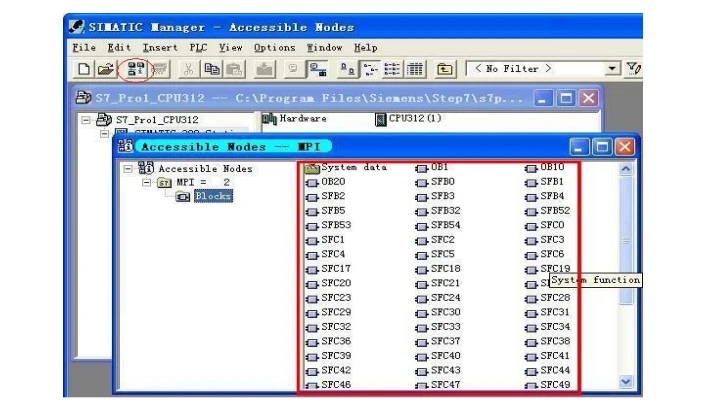
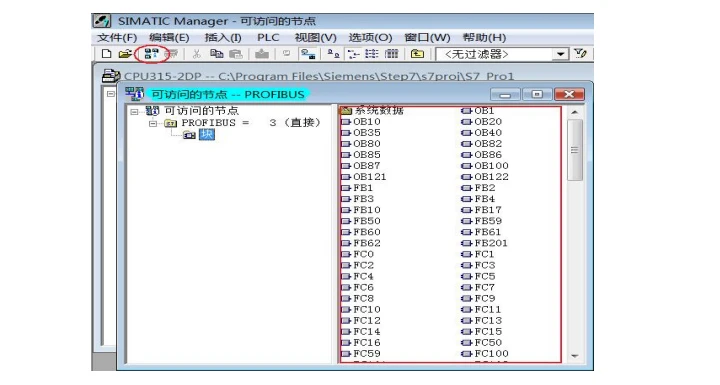
3.Online test: After PC Adapter CN connects MPI interface of S7-300/400PLC and COM port of PC ,then click the red circled button in the main menu as follows and will appear the data in the red marked frame and show the online test is OK. And now all the settings are finished. Now you can go on the work such as program download and upload, monitoring etc.
STEP7 software setting when it communicates with PROFIBUS-DP interface of S7-300/400PLC 10 Connect PC Adapter CN to DP interface of S7-300/400CPU. Enter Step7 software main interface(SIMATIC Manager),click “Set PG/PC interface”under “option”menu to enter PG/PC setting interface. 1.Select “PC Adapter(PROFIBUS)”,click”property” button to enter DP interface parameters setting.

2.Click the top “PROFIBUS” option,set the adapter PROFIBUS interface parameter,the baud rate which you choose must be the same as the PLC PROFIBUS interface baud rate.If you don’t know the PLC PROFIBUS interface baud rate,you could choose “PC Adapter(Auto)” to check.Other parameters are default,click “OK” button to return the previous menu,click”OK” to return the main interface.

PC Adapter CN support PROFIBUS-DP/ Standard/ Universal(DP/FMS). 3.Online test: After PC Adapter CN connects DP interface of S7-300/400PLC and COM port of PC ,then click the red circled button in the main menu as follows and will appear the data in the red marked frame and show the online test is OK. And now all the settings are finished. Now you can go on the work such as program download and upload, monitoring etc.
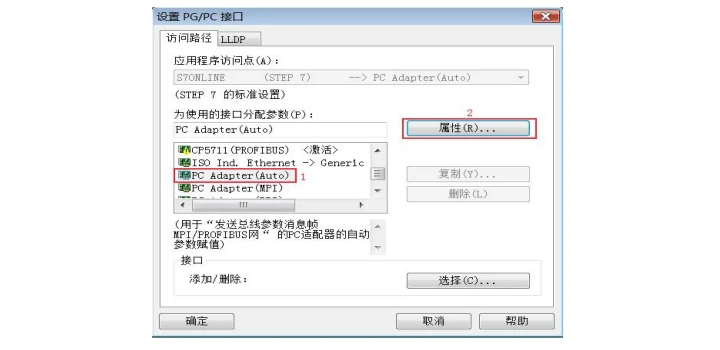
STEP7 software setting when it communicates with S7-300/400PLC using the automatic bus protocol test method Whether PC Adapter CN connects the MPI interface or PROFIBUS interface of S7-300/400CPU,you could both use the automatic bus protocol test method to communicate with PLC, this mothod can automatically test the PLC communication protocol and baud rate etc parameters. 1.Select “PC Adapter(Auto)”,click”property” button to enter bus automatic test setting.
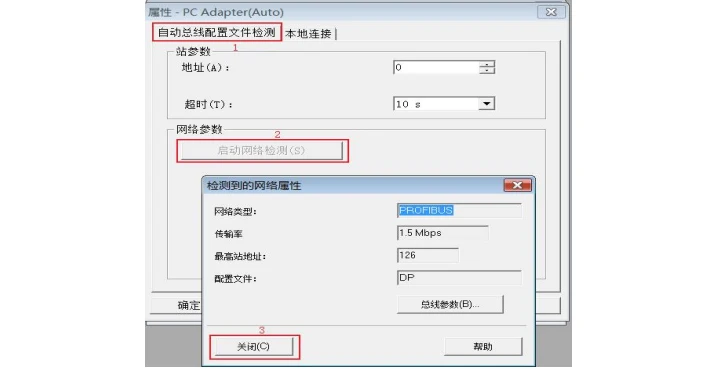
2.Click “start network test”button,then you will get the PLC network type and baud rate etc parameters after several seconds.
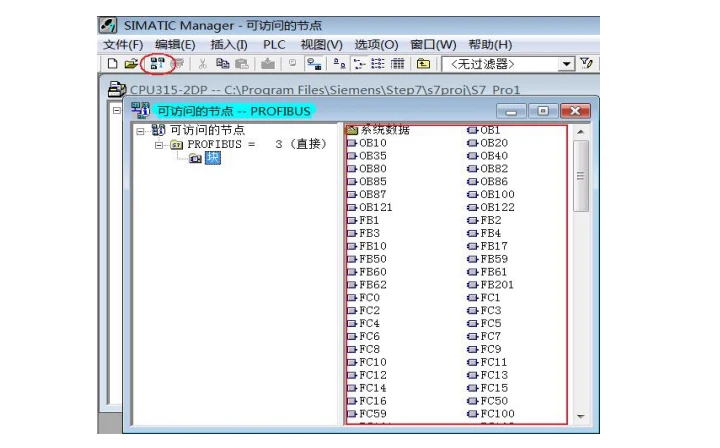
3.Online test: click the red circled button in the main menu as follows and will appear the data in the red marked frame and show the online test is OK. And now all the settings are finished. Now you can go on the work such as program download and upload, monitoring etc.
New and In stock here !!!


Combo Up Savings Up To $1060+
The more you add, the more you'll save!
NewTouchBuff Official Store
Compatible with Siemens PC Adapter and HMI Adapter compatible with high-end adapter RS232-RS485-power three-terminal, In Stock
$69.95 USD
Stop Overpaying for Industrial Gear! As a direct supplier, we cut out middlemen to bring you premium industrial control products at unbeatable prices—PLC modules, replacement cables, industrial fans, touch glass, and more. Our industrial-grade products reduce maintenance costs by 30%, minimize downtime by 40%, and last 2x longer than cheap alternatives. Invest once, save for years—choose cost-effective, reliable gear that keeps your factory efficient and your budget in check. Shop now and enjoy the best value for your industrial procurement!
Estimated delivery between July 26 and July 28.
Price Match
We check our prices every day to ensure we can bring you the best price possible. In the unlikely case that you have found a cheaper price then please contact us on sales@seawens.com and we'll do our best to answer your query right away!
Multibuy Discounts
Planning to purchase multiple electrical appliances or household electronics?
We offer exclusive multibuy discounts with customised package pricing when you order two or more products together.
WhatsApp on (+86) 195 2767 5574 or visit our Multibuy Discounts page for full details and to request your tailored quote today.
Finance
We've partnered up with PayPal!
Why use PayPal?
✅ Safe and private, your bank info is well protected
✅ Official buyer protection, safe for your order
✅ Payment arrives instantly, we can ship immediately
✅ Easy to operate, no complicated bank procedures
✅ Much faster and simpler than TT wire transfer
How does it work?
- Add your purchase to cart
- Select PayPal or Credit Card at the checkout
- Complete PayPal application
- Compare any available finance options
Delivery Information
- Shipping TimeOrders will be shipped within 1–3 working days after payment is confirmed. Stock items can be arranged for shipment on the same day.
- Shipping MethodWe use international express such as DHL, FedEx, UPS, TNT and EMS.For bulk orders, we also support air freight and sea freight.
- Delivery Time
- International Express: About 3–7 working days to most countries
- Air Freight: About 7–15 working days
- Sea Freight: About 25–45 working days (depends on destination port)
- Tracking NumberOnce dispatched, we will send you the tracking number and shipping link immediately. You can check the shipment status online anytime.
- PackagingAll products are packed with anti-static bag, foam box and carton.Professional shockproof and moisture-proof packaging to ensure goods arrive in good condition.
- Customs & DutiesThe import tax and customs duty are borne by the buyer.We can declare a reasonable value to help you reduce customs tax.
- Delivery AddressPlease confirm your full delivery address, postcode and contact phone number correctly. We are not responsible for delivery delay caused by wrong address.
Flexible Delivery
We know that you expect your goods to be delivered promptly and efficiently. That’s why we have made it a priority at NewTouchBuff.com to deliver your goods as quickly as possible using our fast, efficient delivery service which comes direct to your home and is FREE for most items!
- We deliver seven days a week
- Standard deliveries are despatched via specialist carriers and are normally delivered within 3-5 working days.
- Express deliveries are dispatched same day (if ordered before 14:30) for delivery within 1-2 working days.
- For weekend deliveries, orders need to be placed by 14:30 on Friday.
- Larger Items are despatched using our team of specialist nationwide carriers. You will be contacted within 48 hours verifying your order and an estimated delivery date.
- Deliveries direct from manufacturers or suppliers can take a little longer but we will keep you informed and updated.
$69.95 USD
$69.95 USD
Focus on Reliability & Efficiency
Your Industrial Production Deserves the Best—Don’t Settle for Less!
Highly Stimulating
Hurry Up! Limited Stock Alert for Industrial Control Essentials!
PC Adapter CN is a high-tech adapter compatible with Siemens PC Adapter and HMI Adapter,fully support RS232 serial port of PC and HMI to PROFIBUS/MPI communication, adopt the Siemens protocol processor chip,no functional defects. PC Adapter CN is the opto-isolated adapter for industrial design.It has the surge protection and anti-lightning protection circuit on the RS232 interface and RS485 interface, support hot plug, is suitable for Siemens S7-300/400 series PLC and other equipments with PROFIBUS/MPI interface. In particular, it applies to the strong interfere industrial situations and the safeguard in the circuit guarantees the safely running of the system. PC Adapter CN can communicate between S7-300/400PLC and RS232 interface of third party HMI,can replace the Siemens HMI Adapter. The low version PC/MPI+ didn’t adopt the Siemens protocol processor chip,but adopt the MCU and use the software to achieve the profibus protocol,the protocol is not perfect and has the defect,only support MPI communication,not support profibus communication,can only connect few HMI and have the defect. When there are many nodes or third-party device in the network,it can’t identify every node. At the same time, it may have the risk that PC/MPI+ can’t be used after the PLC internal program is upgraded in the future. The network type and baud rate which PC Adapter CN supports:
Main Technical Specifications:
● RS232 interface can connect PC or HMI etc third party devices,baud rate 9.6Kbps~ 115.2Kbps automatically adjust. ● Support PROFIBUS and MPI communication, auto bus protocol test,largest baud rate 1.5Mbps. ● Power supply from PLC port,24VDC, Power Consumption 2W,with over current and surge protection. ● Power-RS485-RS232 all isolated ● Opto-isolated voltage 1000VDC. ● RS232 interface has the anti-surging protection ● RS485 interface has the anti-lightning and surging protector, Repeatability surge capacity: Ipp=100A(10/700us,4KV),meet the standard ITU-TK20/21、VDE 0433. ±15KV ESD protection. ● Need additional 24VDC power for the long distance communication, the largest cable length meets the profibus standard. ● With the power indicator, data sending indicator, data receiving indicator Can install the adapter on the S7-300/400PLC rail or 35MM standard rail. ● Shape Size: 123mm×68mm×30mm(Length*Width*Height),with the mounting bracket ● Working Temperature: -20~+75℃
Why the 24V power, RS232 and RS485 three parties all need to be isolated?That’s because the 7 pin and 2 pin(output 24VDC power) and RS485 interface(DB9F socket 3、4、5、6、8、9pin) on the PLC PROFIBUS socket are isolated,if the adapter is not isolated,it will damage the PLC isolation system,then damage the PLC or cause interference.
PC Adapter CN installation
You can put the PC Adapter CN on your desk or install it on the rail of control cabinet.It has the mounting bracket accessory.User can self-make an Aluminum board with thickness 1.5mm~ 2.5mm,then install the adapter on the S7-300/400PLC rail or 35MM standard rail.
Use the RS232 cable which is attached to the PC Adapter CN to connect the PC Adapter CN and RS232 interface of PC.When you want to connect HMI,user may need to self-make a different RS232 cable according to the HMI user manual of different manufactuers. Extend the communication distance of RS485 interface You need to add a 24VDC power between 7 pin and 2 pin of RS485 interface and connect a termination resistor between 3 pin and 8 pin of RS485 signal for the PC Adapter CN RS485 interface long distance communication.
Product content PC Adapter CN 1PC Mounting bracket 1PC RS232 CABLE, 1PC,5M. Product Manual 1PC Operating System requirement The following operating system is required on the PC Windows 2000 Windows XP Professional Windows XP Home Windows Server 2003 Standard Edition Windows Vista Windows 7 The Usage of PC Adapter CN: Set PG/PC interface: Run STEP7 software,click “Set PG/PC interface” button and will show the following list: - PC Adapter (Auto) - PC Adapter (MPI) - PC Adapter (PROFIBUS) If the above list is not shown,then click "Select..." button to install or remove the interfaces. Select one of interfaces in the list,click” Property”button,Choose the COM port in the “local connection”,transmission rate 19200bps and 38400bps is both OK. PC Adapter CN will automatically adjust the choosed baud rate.Then click “OK”.When you choose the different interfaces in the list,you all choose the COM port in the “local connection”.
If you need to use other baud rate except 19.2K and 38.4K,you need to install a tool software,please consult the manufacturer. STEP7 software setting when it communicates with MPI interface of S7-300/400PLC: Connect PC Adapter CN to MPI interface of S7-300/400CPU. Enter Step7 software main interface(SIMATIC Manager),click “Set PG/PC interface”under “option”menu to enter PG/PC setting interface. 1.Select “PC Adapter(MPI)”,click”property” button to enter MPI interface parameters setting.
1.Click the top “MPI” option,set the adapter MPI interface parameter,choose the baud rate 187.5Kbps or 19.2Kbps or 1.5Mbps,this baud rate must be the same as the PLC MPI interface baud rate.If you don’t know the PLC MPI interface baud rate,you could choose “PC Adapter (Auto)” to check.Other parameters are default,click “OK” button to return the previous menu,click”OK” to return the main interface.
3.Online test: After PC Adapter CN connects MPI interface of S7-300/400PLC and COM port of PC ,then click the red circled button in the main menu as follows and will appear the data in the red marked frame and show the online test is OK. And now all the settings are finished. Now you can go on the work such as program download and upload, monitoring etc.
STEP7 software setting when it communicates with PROFIBUS-DP interface of S7-300/400PLC 10 Connect PC Adapter CN to DP interface of S7-300/400CPU. Enter Step7 software main interface(SIMATIC Manager),click “Set PG/PC interface”under “option”menu to enter PG/PC setting interface. 1.Select “PC Adapter(PROFIBUS)”,click”property” button to enter DP interface parameters setting.
2.Click the top “PROFIBUS” option,set the adapter PROFIBUS interface parameter,the baud rate which you choose must be the same as the PLC PROFIBUS interface baud rate.If you don’t know the PLC PROFIBUS interface baud rate,you could choose “PC Adapter(Auto)” to check.Other parameters are default,click “OK” button to return the previous menu,click”OK” to return the main interface.
PC Adapter CN support PROFIBUS-DP/ Standard/ Universal(DP/FMS). 3.Online test: After PC Adapter CN connects DP interface of S7-300/400PLC and COM port of PC ,then click the red circled button in the main menu as follows and will appear the data in the red marked frame and show the online test is OK. And now all the settings are finished. Now you can go on the work such as program download and upload, monitoring etc.
STEP7 software setting when it communicates with S7-300/400PLC using the automatic bus protocol test method Whether PC Adapter CN connects the MPI interface or PROFIBUS interface of S7-300/400CPU,you could both use the automatic bus protocol test method to communicate with PLC, this mothod can automatically test the PLC communication protocol and baud rate etc parameters. 1.Select “PC Adapter(Auto)”,click”property” button to enter bus automatic test setting.
2.Click “start network test”button,then you will get the PLC network type and baud rate etc parameters after several seconds.
3.Online test: click the red circled button in the main menu as follows and will appear the data in the red marked frame and show the online test is OK. And now all the settings are finished. Now you can go on the work such as program download and upload, monitoring etc.
New and In stock here !!!
Authencity Guaranteed
We only sell authentic products from verified brand partners and retail partners globally.
Maintenance, Repair And Replacement


$750.00 USD
Receives in 5 days.


$250.95 USD
Receives in 5 days.

$449.95 USD
Receives in 5 days.


$179.95 USD
Receives in 5 days.


$189.95 USD
Receives in 5 days.


$204.95 USD
Receives in 5 days.


$229.95 USD
Receives in 5 days.


$219.95 USD
Receives in 5 days.


Receives in 5 days.


$109.95 USD
Receives in 5 days.


Receives in 5 days.


Receives in 5 days.


- Choosing a selection results in a full page refresh.
- Opens in a new window.