Ihr Warenkorb
Ihr Warenkorb ist leer


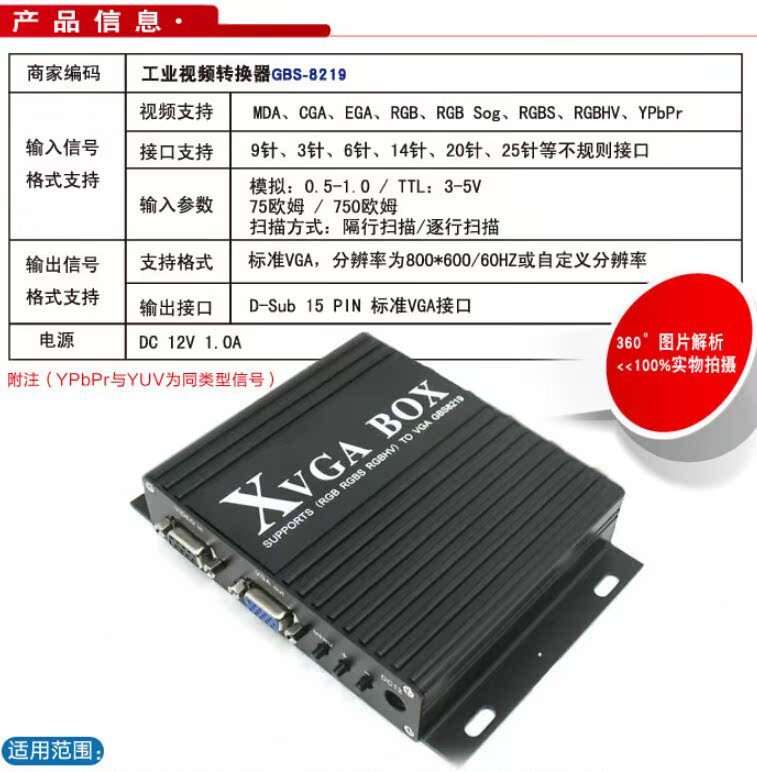
Printing machine/Bearing milling machine/Circuit board drilling machine/Glass edger Display maintenance GBS-8219 genuine
For more successful solutions for RGB to VGA industrial converter GBS-8219, please contact us

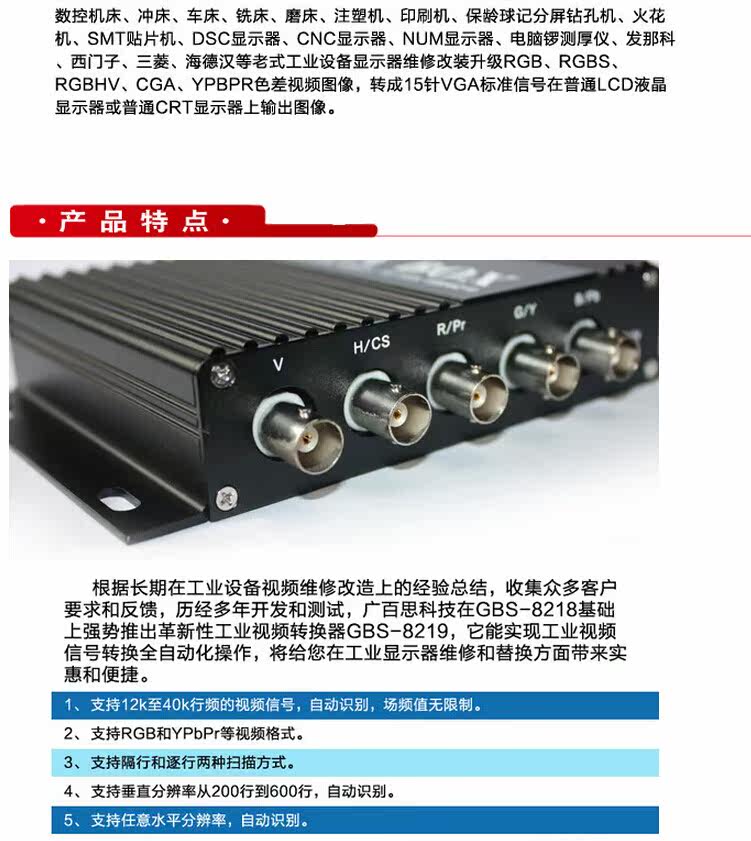
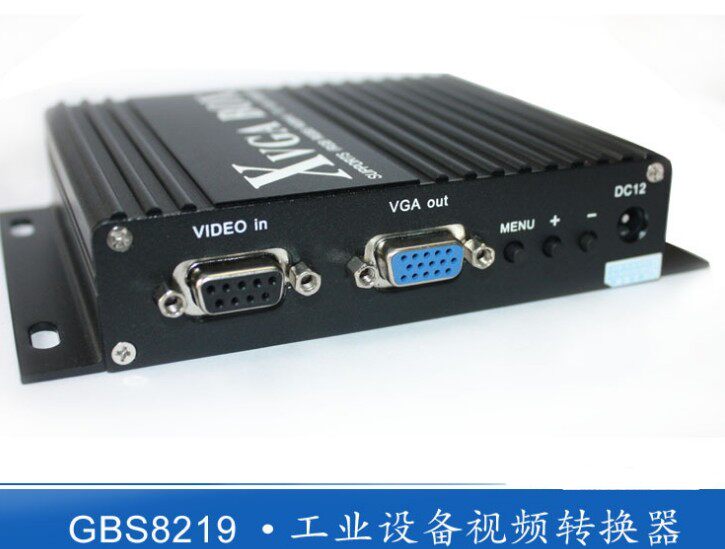
Product interface structure diagram

The above interface is introduced as follows:
DC12V: Power input, DC 12V voltage, current 1A or above.
MENU, +, -: Device adjustment menu keys, +, - keys to move the cursor up and down or modify the value.
VGA OUT: Standard VGA signal output interface, directly connected to LCD or VGA devices.
VIDEO IN: 9-pin signal input interface, connecting the original signal output by industrial and other equipment.
V: field synchronization signal.
H/CS: line synchronization signal, or compound synchronization signal.
R/Pr: red signal, or color difference PR signal.
G/Y: Green signal, or Y signal with color difference.
B/Pb: Blue signal, or Pb signal with color difference.
RUN: Equipment operation indicator.
Among them, 9 pins or BNC mode input, you can choose one of them.
9-Pin signal input port definition
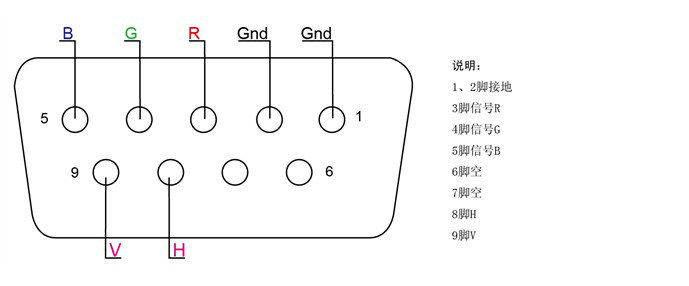
Video signal input method


GBS8219 Menu Item Definition

1. Horizontal position: This item can adjust the horizontal start position of the video display.
2. Horizontal size: This item can adjust the size of the video display width.
3. Vertical position: This item can adjust the vertical start position of the video display.
4. Vertical size: This item can adjust the size of the video display height.
5. Phase adjustment: This item can fine-tune the phase of the video source.
6. Video source type: This item is selected by the user to enter the video source type (RGB, or YUV). If the user selects the wrong video source, the video display color may be incorrect.
7. Synchronization signal: This item automatically recognizes the synchronization signal of the input video and can also be adjusted by the user.
8. Input impedance: This item is selected by the user to have an input impedance of 75 ohms or 750 ohms. If the input resistance is large, the brightness will be large.
9. Scanning method: This item allows the user to select whether the input video information is interlaced or progressive.
10. Exit and save: After the user adjusts all parameters, exit and save all parameters.
If you don't press any key for 11 or 15 seconds, the menu will automatically save the current parameters and exit. (The OSD menu will appear when there is no signal source input)
GBS 8219 Key operation definition
1. Enter the general settings menu: press the menu key once.
2. Enter the advanced settings menu: press and hold the menu button for 5 seconds.
3. Move the cursor down: press the + key.
4. Move the cursor up: press the - key.
5. Select the current item: press the menu key
6. Exit the current project: Press the menu key
7. Modify the selected item: + or - key.
GBS 8219 menu adjustment order
Step 1: After connecting the signal, if there is no display or the display color is incorrect, adjust the video source type item to be consistent with the input video signal type, and the color will be displayed normally. (Options are: YUV color difference, RGB (D) digital TTL signal, RGB (A) analog signal)
Step 2: The system can automatically identify the synchronization signal. If the image color display is normal after adjusting the first step, there is no need to manually adjust this item; if the image distortion occurs, you need to manually adjust the synchronization signal to be consistent with the synchronization type of the signal source, and the screen can be displayed normally.
Step 3: If the screen display is elongated and overflows to the bottom of the screen, adjust the scanning method to: Progressive; if the vertical position is adjusted to the maximum, the image display still only accounts for half of the display, then adjust the scanning method to: Interlaced.
Step 4: Adjust the horizontal position, horizontal size, vertical position, and vertical size items to a satisfactory position.
Step 5: Input impedance, choose the input impedance that matches the signal source, choose 750 ohms, which is relatively bright. If you choose 750 ohms to be all white, you should choose 75 ohms.
Step 6: Phase adjustment. If there is a slight wavy jitter up and down the image, you can adjust this to match the phase of the input signal.
Step 7: Save and exit. Save all parameters on the menu and exit.
Kombinationsangebot Sparen bis zu $1060+
Je mehr du hinzufügst, desto mehr sparst du!
NewTouchBuff Official Store
Printing machine/Bearing milling machine/Circuit board drilling machine/Glass edger Display maintenance GBS-8219 genuine
Hören Sie auf, zu viel für Industrieausrüstung zu zahlen! Als direkter Lieferant schalten wir Mittelsleute aus, um Ihnen hochwertige Industrie-Steuerungsprodukte zu unschlagbaren Preisen anzubieten – PLC-Module, Ersatzkabel, Industriefans, Touch-Glas und vieles mehr. Unsere Produkte mit Industriequalität senken die Wartungskosten um 30 %, minimieren die Ausfallzeit um 40 % und halten zwei Mal länger als billige Alternativen. Investieren Sie einmal und sparen Sie jahrelang – wählen Sie kostengünstige, zuverlässige Ausrüstung, die Ihre Fabrik effizient hält und Ihr Budget im Griff behält. Jetzt bestellen und den besten Wert für Ihre Industrie-Beschaffung genießen!
Geschätzte Lieferung zwischen August 09 und August 11.
Preisabgleich
Wir überprüfen unsere Preise jeden Tag, um sicherzustellen, dass wir dir den bestmöglichen Preis anbieten können. Im unwahrscheinlichen Fall, dass du einen günstigeren Preis gefunden hast, kontaktiere uns bitte unter sales@seawens.com und wir werden unser Bestes tun, um deine Anfrage umgehend zu beantworten!
Mehrkauf-Rabatte
Möchten Sie mehrere Elektrogeräte oder Haushalts-Elektronikprodukte kaufen?
Wir bieten exklusive Mehrfachkauf-Rabatte mit maßgeschneiderten Paketpreisen an, wenn Sie zwei oder mehr Produkte gemeinsam bestellen.
Schreiben Sie uns auf WhatsApp unter (+86) 195 2767 5574 oder besuchen Sie unsere Mehrfachkauf-Rabatten-Seite , um alle Details zu erfahren und heute Ihr maßgeschneidertes Angebot anzufordern.
Finanzen
Wir haben eine Partnerschaft mit PayPal eingegangen!
Warum PayPal nutzen?
✅ Sicher und privat, Ihre Bankdaten sind bestens geschützt
✅ Offizieller Käuferschutz, sicher für Ihre Bestellung
✅ Zahlung geht sofort ein, wir können Ihre Bestellung sofort versenden
✅ Einfach zu bedienen, keine komplizierten Bankvorgänge
✅ Viel schneller und unkomplizierter als eine TT-Überweisung
Wie funktioniert es?
- Fügen Sie Ihre Bestellung dem Warenkorb hinzu
- Wählen Sie bei der Kasse PayPal oder Kreditkarte aus
- Schließen Sie die PayPal-Anwendung ab
- Vergleichen Sie alle verfügbaren Finanzierungsoptionen
Lieferinformationen
- VersandzeitBestellungen werden innerhalb von 1–3 Werktagen nach Zahlungsbestätigung versandt. Lagerbestandsartikel können am selben Tag versandt werden.
- VersandartenWir nutzen internationale Expressdienste wie DHL, FedEx, UPS, TNT und EMS. Bei Großbestellungen unterstützen wir auch Luftfracht und Seefracht.
- Lieferzeit
- Internationaler Express: Ca. 3–7 Werktagen für die meisten Länder
- Luftfracht: Ca. 7–15 Werktagen
- Seefracht: Ca. 25–45 Werktagen (hängt vom Zielhafen ab)
- SendungsnummerNach Versand senden wir Ihnen umgehend die Sendungsnummer und den Versandlink zu. Sie können den Versandstatus jederzeit online einsehen.
- VerpackungAlle Produkte werden in antistatischen Beuteln, Schaumkisten und Kartons verpackt. Professionelle stoßfeste und feuchtigkeitsgeschützte Verpackung, um sicherzustellen, dass die Waren unbeschädigt gelangen.
- Zölle und AbgabenDie Einfuhrsteuer und die Zölle trägt der Käufer. Wir können einen angemessenen Warenwert angeben, um Ihnen bei der Senkung der Zölle zu helfen.
- LieferadresseBitte bestätigen Sie Ihre vollständige Lieferadresse, Postleitzahl und Kontaktelefonnummer korrekt. Wir übernehmen keine Haftung für Lieferverzögerungen aufgrund falscher Adressangaben.
Flexible Lieferung
Wir wissen, dass Sie erwarten, dass Ihre Waren pünktlich und effizient geliefert werden. Deshalb hat es sich bei NewTouchBuff.com zur Priorität gemacht, Ihre Waren so schnell wie möglich mit unserem schnellen, effizienten Lieferdienst zuzustellen, der direkt zu Ihnen nach Hause liefert – und das ist für die meisten Artikel KOSTENLOS!
- Wir liefern sieben Tage die Woche
- Standardlieferungen werden über spezielle Spediteure versandt und erreichen Sie in der Regel innerhalb von 3-5 Werktagen.
- Expresslieferungen werden am selben Tag versandt (sofern vor 14:30 Uhr bestellt) und erreichen Sie innerhalb von 1-2 Werktagen.
- Für Lieferungen am Wochenende müssen die Bestellungen bis 14:30 Uhr am Freitag eingehen.
- Größere Artikel werden mit unserem Team von spezialisierten landesweiten Spediteuren versandt. Sie werden innerhalb von 48 Stunden kontaktiert, um Ihren Auftrag und einen voraussichtlichen Liefertermin zu bestätigen.
- Lieferungen direkt von Herstellern oder Lieferanten können etwas länger dauern, aber wir halten Sie stets auf dem Laufenden.
Fokus auf Zuverlässigkeit und Effizienz
Ihre industrielle Produktion verdient das Beste – lassen Sie sich nicht mit weniger zufrieden!
Hochgradig Stimulierend
Schnell! Warnung: Knapper Lagerbestand für Industriesteuerungs-Grundausstattung!
For more successful solutions for RGB to VGA industrial converter GBS-8219, please contact us
Product interface structure diagram
The above interface is introduced as follows:
DC12V: Power input, DC 12V voltage, current 1A or above.
MENU, +, -: Device adjustment menu keys, +, - keys to move the cursor up and down or modify the value.
VGA OUT: Standard VGA signal output interface, directly connected to LCD or VGA devices.
VIDEO IN: 9-pin signal input interface, connecting the original signal output by industrial and other equipment.
V: field synchronization signal.
H/CS: line synchronization signal, or compound synchronization signal.
R/Pr: red signal, or color difference PR signal.
G/Y: Green signal, or Y signal with color difference.
B/Pb: Blue signal, or Pb signal with color difference.
RUN: Equipment operation indicator.
Among them, 9 pins or BNC mode input, you can choose one of them.
9-Pin signal input port definition
Video signal input method
GBS8219 Menu Item Definition
1. Horizontal position: This item can adjust the horizontal start position of the video display.
2. Horizontal size: This item can adjust the size of the video display width.
3. Vertical position: This item can adjust the vertical start position of the video display.
4. Vertical size: This item can adjust the size of the video display height.
5. Phase adjustment: This item can fine-tune the phase of the video source.
6. Video source type: This item is selected by the user to enter the video source type (RGB, or YUV). If the user selects the wrong video source, the video display color may be incorrect.
7. Synchronization signal: This item automatically recognizes the synchronization signal of the input video and can also be adjusted by the user.
8. Input impedance: This item is selected by the user to have an input impedance of 75 ohms or 750 ohms. If the input resistance is large, the brightness will be large.
9. Scanning method: This item allows the user to select whether the input video information is interlaced or progressive.
10. Exit and save: After the user adjusts all parameters, exit and save all parameters.
If you don't press any key for 11 or 15 seconds, the menu will automatically save the current parameters and exit. (The OSD menu will appear when there is no signal source input)
GBS 8219 Key operation definition
1. Enter the general settings menu: press the menu key once.
2. Enter the advanced settings menu: press and hold the menu button for 5 seconds.
3. Move the cursor down: press the + key.
4. Move the cursor up: press the - key.
5. Select the current item: press the menu key
6. Exit the current project: Press the menu key
7. Modify the selected item: + or - key.
GBS 8219 menu adjustment order
Step 1: After connecting the signal, if there is no display or the display color is incorrect, adjust the video source type item to be consistent with the input video signal type, and the color will be displayed normally. (Options are: YUV color difference, RGB (D) digital TTL signal, RGB (A) analog signal)
Step 2: The system can automatically identify the synchronization signal. If the image color display is normal after adjusting the first step, there is no need to manually adjust this item; if the image distortion occurs, you need to manually adjust the synchronization signal to be consistent with the synchronization type of the signal source, and the screen can be displayed normally.
Step 3: If the screen display is elongated and overflows to the bottom of the screen, adjust the scanning method to: Progressive; if the vertical position is adjusted to the maximum, the image display still only accounts for half of the display, then adjust the scanning method to: Interlaced.
Step 4: Adjust the horizontal position, horizontal size, vertical position, and vertical size items to a satisfactory position.
Step 5: Input impedance, choose the input impedance that matches the signal source, choose 750 ohms, which is relatively bright. If you choose 750 ohms to be all white, you should choose 75 ohms.
Step 6: Phase adjustment. If there is a slight wavy jitter up and down the image, you can adjust this to match the phase of the input signal.
Step 7: Save and exit. Save all parameters on the menu and exit.
Garantierte Echtheit
Wir verkaufen nur authentische Produkte von verifizierten Markenpartnern und Einzelhandelspartnern weltweit.
WARTUNG, REPARATUR UND ERSETZUNG


$750.00 USD
Receives in 6 days.


$250.95 USD
Receives in 6 days.

$449.95 USD
Receives in 6 days.


$179.95 USD
Receives in 6 days.


$189.95 USD
Receives in 6 days.


$204.95 USD
Receives in 6 days.


$229.95 USD
Receives in 6 days.


$219.95 USD
Receives in 6 days.


Receives in 6 days.


$109.95 USD
Receives in 6 days.


Receives in 6 days.


Receives in 6 days.


- Die Auswahl führt zu einem vollständigen Seiten-Refresh.
- Öffnet in einem neuen Fenster.