Ihr Warenkorb
Ihr Warenkorb ist leer


6ES7972-0CB20-0XA0:Compatible with Siemens PC Adapter USB Adapter Maximum Rate 1.5Mbps Optical Isolation
$69.95 USD
Please Note, this goods made by us, not original simatic products.
But it can communication with your PLC and HMI.
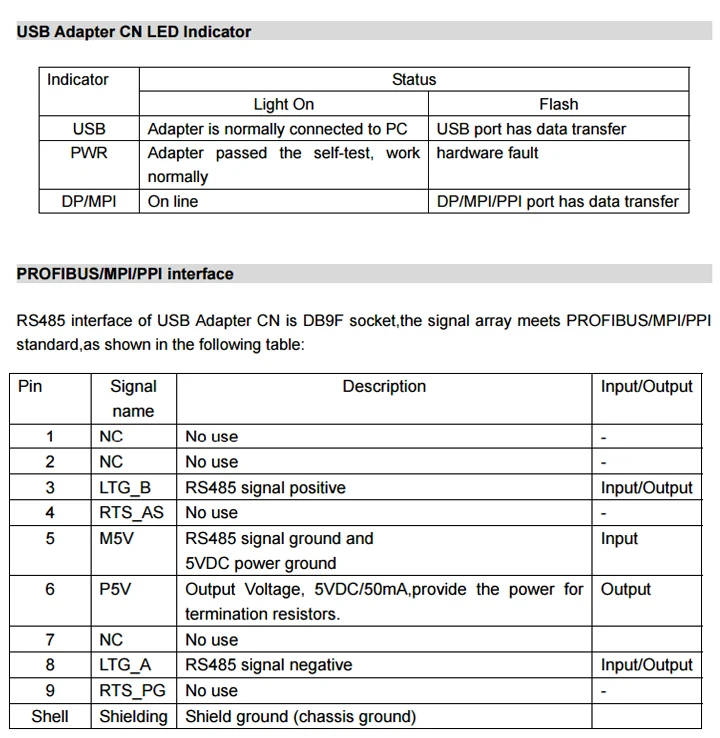
USB Adapter CN is a high-tech adapter similar , support USB of computer to PROFIBUS/MPI/PPI communication, USB Adapter CN adopt power supply from USB port,use the low-power low-voltage chip,even if the USB port power low down to 4V,it still can ensure the stable and reliable work of the adapter. RS485 interface(PROFIBUS/MPI/PPI) of USB Adapter CN is the standard interface as same as the CP5611/CP5512, the 6PIN and 5PIN of DB9F socket output 5VDC power which can supply the power for the termination resistors. Besides it can be used for S7-200/300/400 PLC,it also can be used for HMI,CNC etc other third party equipments,support long distance communication,allowed cable length meet the profibus standard.

Main Technical Specifications:
● Compatible with USB V1.1 and USB V2.0 specifications,connect the USB port of PC to DP/MPI/PPI interface of S7 system. ● Support PROFIBUS/MPI/PPI communication,auto bus protocol test ● You can download the latest software from Siemens website to update the firmware for USB Adapter CN to get the latest function ● Power supply from USB port, power consumption about 150mA,with over current and surge protection ● Opto-isolated voltage 1000VDC. ● USB port has the anti-surging protection ● RS485 interface has the anti-lightning and surging protector, Repeatability surge capacity: Ipp=100A(10/700us,4KV),meet the standard ITU-TK20/21、VDE 0433. ±15KV ESD protection. ● support long distance communication,the largest communication distance meet the profibus standard ● With the power indicator, USB indicator, DP/MPI indicator. ● One PC only support one USB Adapter CN ● Can install the adapter on the S7-300/400PLC rail or 35MM standard rail. ● Overall Size: 123mm×68mm×30mm(Length*Width*Height),with the mounting bracket ● Working Temperature: -20~+75℃

USB Adapter CN installation
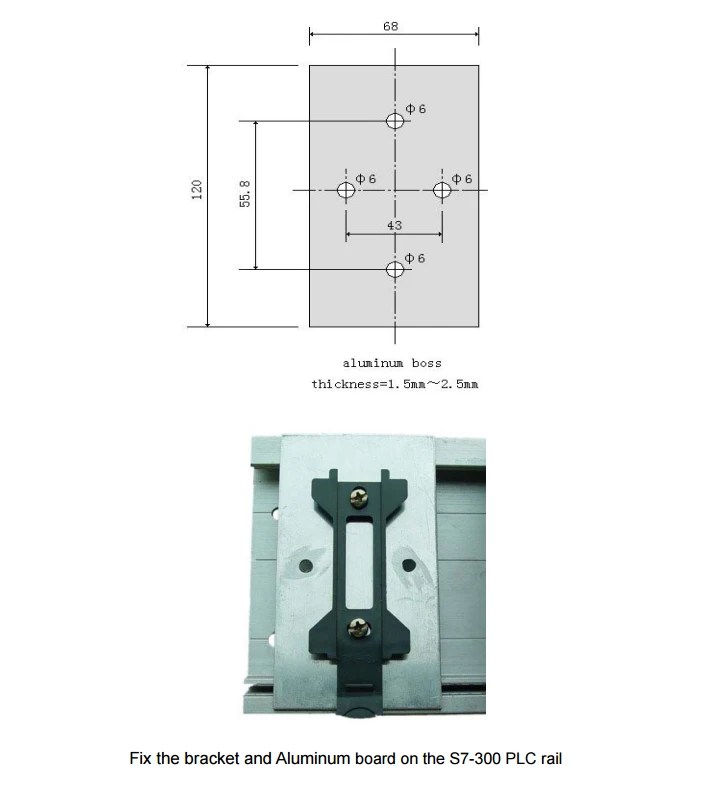
You can put the USB Adapter CN on your desk or install it on the rail of control cabinet.It has the mounting bracket accessory.User can self-make an Aluminum board with thickness 1.5mm~ 2.5mm,then install the adapter on the S7-300/400PLC rail or 35MM standard rail.
PROFIBUS/MPI/PPI interface connection cable
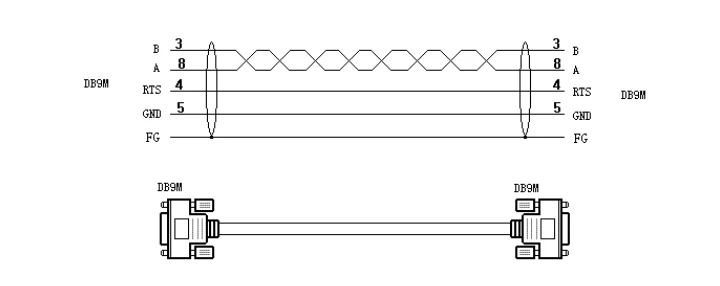
There is a pc of 5 m cable attached with the adapter,it’s used to connect the USB Adapter CN and PLC,correspond to Siemens 6ES7 901-0BF00-0AA0,as shown below:
Long distance communication
USB Adapter CN power is provided by the USB port,voltage is +5VDC±15%,150mA,not from RS485 interface of PLC.Thus the adapter can also be used for the other DP/MPI/PPI interfaces without 24VDC power output.Besides the RS485 interface of USB Adapter CN is as same as Siemens CP5611/CP5512,you can insert the profibus connector to achieve the long distance communication,and provide the power for the termination resistors of profibus connector. Different baud rates allowed the largest communication distance meet the PROFIBUS standard,as shown in the following table:

Product Content
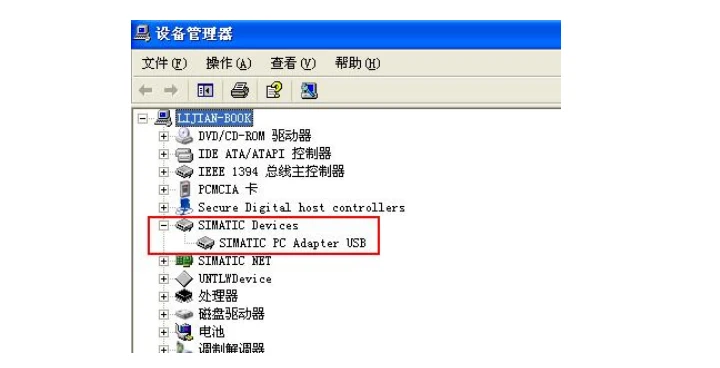
USB Adapter CN 1PC Mounting bracket 1PC USB connection cable 1PC,2M. MPI connection cable 1PC,5M. Driver CD 1PC Operating System requirement The following operating system is required on the PC Windows 2000 Windows XP Professional Windows XP Home Windows Server 2003 Standard Edition Windows Vista Windows 7 You need to install STEP7 software for S7-300/400PLC, STEP7-Micro/WIN software for S7-200PLC when you use USB Adapter CN to communicate.For other devices like HMI,CNC to communicate,it’s also required to install the corresponding application softwares. Start to use USB Adapter CN Install driver After you install STEP7 or STEP7 Micro/WIN etc softwares on the PC,you still need to install the Siemens original PC_Adapter_USB driver, the driver is included in the CD. You also could download the latest version PC_Adapter_USB driver from Siemens website, the link is http://www.ad.siemens.com.cn/download/docList.aspx?TypeId=5&CatFirst=1&PageIndex=4 Check whether the USB Adapter CN can work well after you install the driver,right click”My computer”->Property->hardware->device manager,plug the USB Adapter CN in the USB port of PC,device manager will appear a new device as shown in the following red box,which show the hardware and driver work well.
It will appear the “USB” option in the “local connection” of “set PG/PC interface” in the Step7 software after you finish installing the driver,and then choose this USB option. Set PG/PC interface: Run STEP7 or STEP7 Micro/WIN software,click “Set PG/PC” button and then it will show the following choice list: - PC Adapter (Auto) (This option will be shown only after you install the STEP 7) - PC Adapter (MPI) - PC Adapter (PPI) (This option will be shown only after you install the 7-Micro/WIN) - PC Adapter (PROFIBUS) If it doesn’t show the above list,please click "Select..." button to install or remove the interfaces. Select one interface in the list.click”property”,it will appear “USB” option in the “local connection”,choose this “USB” option and then click “OK”.

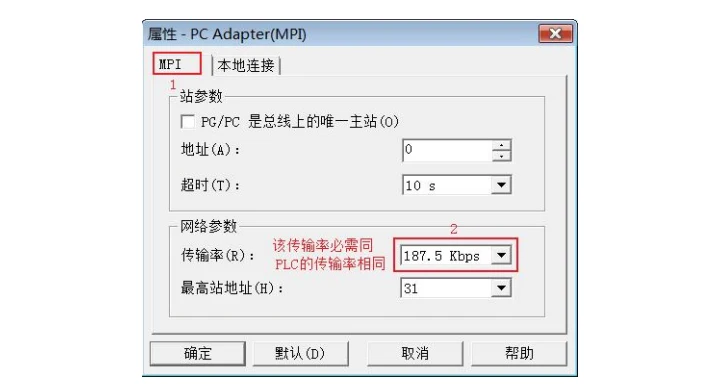
In the next the connection between USB Adapter CN and DP/MPI/PPI interface of PLC is OK,and you could do the downloading,uploading and monitoring operation. STEP7 software setting when it communicates with MPI interface of S7-300/400PLC: Connect USB Adapter CN to MPI interface of S7-300/400CPU. Enter Step7 software main interface(SIMATIC Manager),click “Set PG/PC interface”under “option”menu to enter PG/PC setting interface. 1.Select “PC Adapter(MPI)”, click”property” button to enter MPI interface parameters setting.

2.Click the top “MPI” option,set the adapter MPI interface parameter,choose the baud rate 187.5Kbps or 19.2Kbps or 1.5Mbps,this baud rate must be the same as the PLC MPI interface baud rate.If you don’t know the PLC MPI interface baud rate,you could choose “PC Adapter (Auto)” to check.Other parameters are default,click “OK” button to return the previous menu,click”OK” to return the main interface.
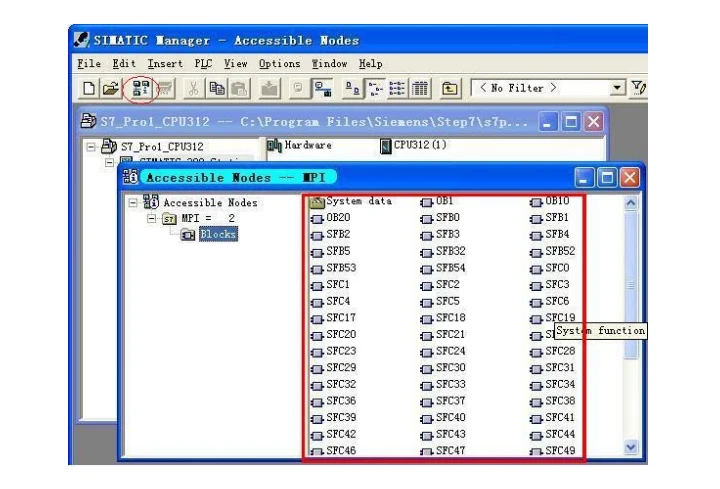
3.Online test: After USB Adapter CN connects MPI interface of S7-300/400PLC and USB port of PC ,then click the red circled button in the main menu as follows and will appear the data in the red marked frame and show the online test is OK. And now all the settings are finished. Now you can go on the work such as program download and upload, monitoring etc.
STEP7 software setting when it communicates with PROFIBUS-DP interface of S7-300/400PLC:
Connect USB Adapter CN to DP interface of S7-300/400CPU. Enter Step7 software main interface(SIMATIC Manager),click “Set PG/PC interface”under “option”menu to enter PG/PC setting interface. 1.Select “PC Adapter(PROFIBUS)”,click”property” button to enter DP interface parameters setting.

2.Click the top “PROFIBUS” option,set the adapter PROFIBUS interface parameter,the baud rate which you choose must be the same as the PLC PROFIBUS interface baud rate.If you don’t know the PLC PROFIBUS interface baud rate,you could choose “PC Adapter(Auto)” to check.Other parameters are default,click “OK” button to return the previous menu,click”OK” to return the main interface.

USB Adapter CN support PROFIBUS-DP/ Standard/ Universal(DP/FMS)/ User-defined 3.Online test: After USB Adapter CN connects DP interface of S7-300/400PLC and USB port of PC ,then click the red circled button in the main menu as follows and will appear the data in the red marked frame and show the online test is OK. And now all the settings are finished. Now you can go on the work such as program download and upload, monitoring etc.

STEP7 software setting when it communicates with S7-300/400PLC using the automatic bus protocol test method:
Whether USB Adapter CN connects the MPI interface or PROFIBUS interface of S7-300/400CPU, you could both use the automatic bus protocol test method to communicate with PLC, this mothod can automatically test the PLC communication protocol and baud rate etc parameters. 1.Select “PC Adapter(Auto)”, click”property” button to enter bus automatic test setting.

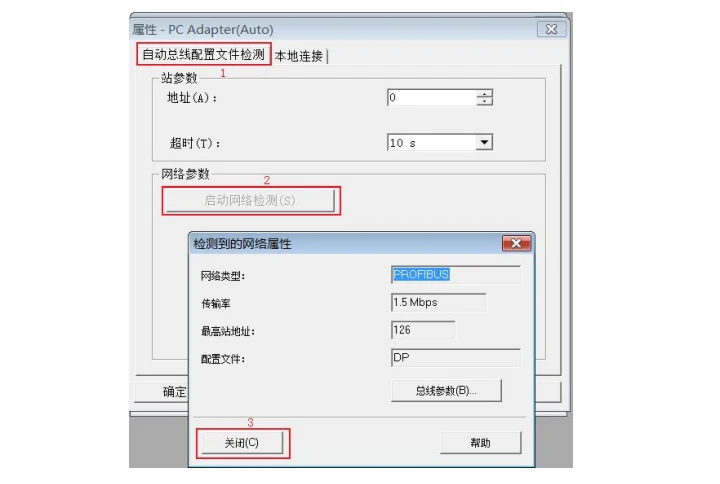
3.Online test: click the red circled button in the main menu as follows and will appear the data in the red marked frame and show the online test is OK. And now all the settings are finished

STEP7 Micro/WIN software setting when it communicates with PPI interface of S7-200PLC: USB Adapter CN can be used for the communication of Siemens S7-200PLC with multi-master PPI and advanced PPI,like CPU22X series PLC. For the earlier CPU21X series PLC,they can’t communicate with USB Adapter CN because they don’t support multi-master PPI and advanced PPI. Connect USB Adapter CN to RS485 interface of S7-200CPU. Enter STEP7 Micro/WIN software main interface,click the lower left corner “Set PG/PC interface” button to enter the PG/PC setting interface. 1.Select “PC Adapter(PPI)”,click”property” button to enter local connection and PPI interface parameters setting.

3.Click the top “PPI” option,set the adapter PPI interface parameter,the baud rate which you choose must be the same as the PLC baud rate.Other parameters are default,click “OK” button to return the previous menu,click”OK” to return the main interface. You can see the parameters are fixed advanced PPI and multi-master PPI,you can’t change.
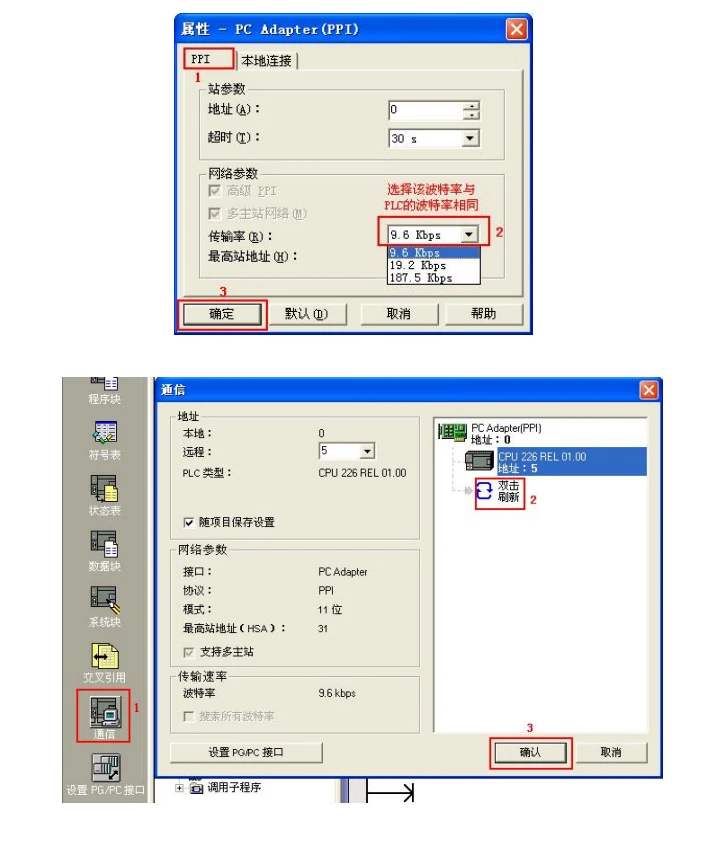
4.Online test: After USB Adapter CN connects RS485 interface of S7-200CPU and USB port of PC, click the “communicate” button in the lower left corner of main interface to enter searching PLC interface, double-click “Double-click Refresh” icon,then you can search out the PLC which is connected with USB Adapter CN, Select the PLC and then click”OK” to return the main interface. Now you can go on the work such as program download and upload, monitoring etc.
New and In stock here !!!

Kombinationsangebot Sparen bis zu $1060+
Je mehr du hinzufügst, desto mehr sparst du!
NewTouchBuff Official Store
6ES7972-0CB20-0XA0:Compatible with Siemens PC Adapter USB Adapter Maximum Rate 1.5Mbps Optical Isolation
$69.95 USD
Hören Sie auf, zu viel für Industrieausrüstung zu zahlen! Als direkter Lieferant schalten wir Mittelsleute aus, um Ihnen hochwertige Industrie-Steuerungsprodukte zu unschlagbaren Preisen anzubieten – PLC-Module, Ersatzkabel, Industriefans, Touch-Glas und vieles mehr. Unsere Produkte mit Industriequalität senken die Wartungskosten um 30 %, minimieren die Ausfallzeit um 40 % und halten zwei Mal länger als billige Alternativen. Investieren Sie einmal und sparen Sie jahrelang – wählen Sie kostengünstige, zuverlässige Ausrüstung, die Ihre Fabrik effizient hält und Ihr Budget im Griff behält. Jetzt bestellen und den besten Wert für Ihre Industrie-Beschaffung genießen!
Geschätzte Lieferung zwischen August 03 und August 05.
Preisabgleich
Wir überprüfen unsere Preise jeden Tag, um sicherzustellen, dass wir dir den bestmöglichen Preis anbieten können. Im unwahrscheinlichen Fall, dass du einen günstigeren Preis gefunden hast, kontaktiere uns bitte unter sales@seawens.com und wir werden unser Bestes tun, um deine Anfrage umgehend zu beantworten!
Mehrkauf-Rabatte
Möchten Sie mehrere Elektrogeräte oder Haushalts-Elektronikprodukte kaufen?
Wir bieten exklusive Mehrfachkauf-Rabatte mit maßgeschneiderten Paketpreisen an, wenn Sie zwei oder mehr Produkte gemeinsam bestellen.
Schreiben Sie uns auf WhatsApp unter (+86) 195 2767 5574 oder besuchen Sie unsere Mehrfachkauf-Rabatten-Seite , um alle Details zu erfahren und heute Ihr maßgeschneidertes Angebot anzufordern.
Finanzen
Wir haben eine Partnerschaft mit PayPal eingegangen!
Warum PayPal nutzen?
✅ Sicher und privat, Ihre Bankdaten sind bestens geschützt
✅ Offizieller Käuferschutz, sicher für Ihre Bestellung
✅ Zahlung geht sofort ein, wir können Ihre Bestellung sofort versenden
✅ Einfach zu bedienen, keine komplizierten Bankvorgänge
✅ Viel schneller und unkomplizierter als eine TT-Überweisung
Wie funktioniert es?
- Fügen Sie Ihre Bestellung dem Warenkorb hinzu
- Wählen Sie bei der Kasse PayPal oder Kreditkarte aus
- Schließen Sie die PayPal-Anwendung ab
- Vergleichen Sie alle verfügbaren Finanzierungsoptionen
Lieferinformationen
- VersandzeitBestellungen werden innerhalb von 1–3 Werktagen nach Zahlungsbestätigung versandt. Lagerbestandsartikel können am selben Tag versandt werden.
- VersandartenWir nutzen internationale Expressdienste wie DHL, FedEx, UPS, TNT und EMS. Bei Großbestellungen unterstützen wir auch Luftfracht und Seefracht.
- Lieferzeit
- Internationaler Express: Ca. 3–7 Werktagen für die meisten Länder
- Luftfracht: Ca. 7–15 Werktagen
- Seefracht: Ca. 25–45 Werktagen (hängt vom Zielhafen ab)
- SendungsnummerNach Versand senden wir Ihnen umgehend die Sendungsnummer und den Versandlink zu. Sie können den Versandstatus jederzeit online einsehen.
- VerpackungAlle Produkte werden in antistatischen Beuteln, Schaumkisten und Kartons verpackt. Professionelle stoßfeste und feuchtigkeitsgeschützte Verpackung, um sicherzustellen, dass die Waren unbeschädigt gelangen.
- Zölle und AbgabenDie Einfuhrsteuer und die Zölle trägt der Käufer. Wir können einen angemessenen Warenwert angeben, um Ihnen bei der Senkung der Zölle zu helfen.
- LieferadresseBitte bestätigen Sie Ihre vollständige Lieferadresse, Postleitzahl und Kontaktelefonnummer korrekt. Wir übernehmen keine Haftung für Lieferverzögerungen aufgrund falscher Adressangaben.
Flexible Lieferung
Wir wissen, dass Sie erwarten, dass Ihre Waren pünktlich und effizient geliefert werden. Deshalb hat es sich bei NewTouchBuff.com zur Priorität gemacht, Ihre Waren so schnell wie möglich mit unserem schnellen, effizienten Lieferdienst zuzustellen, der direkt zu Ihnen nach Hause liefert – und das ist für die meisten Artikel KOSTENLOS!
- Wir liefern sieben Tage die Woche
- Standardlieferungen werden über spezielle Spediteure versandt und erreichen Sie in der Regel innerhalb von 3-5 Werktagen.
- Expresslieferungen werden am selben Tag versandt (sofern vor 14:30 Uhr bestellt) und erreichen Sie innerhalb von 1-2 Werktagen.
- Für Lieferungen am Wochenende müssen die Bestellungen bis 14:30 Uhr am Freitag eingehen.
- Größere Artikel werden mit unserem Team von spezialisierten landesweiten Spediteuren versandt. Sie werden innerhalb von 48 Stunden kontaktiert, um Ihren Auftrag und einen voraussichtlichen Liefertermin zu bestätigen.
- Lieferungen direkt von Herstellern oder Lieferanten können etwas länger dauern, aber wir halten Sie stets auf dem Laufenden.
$69.95 USD
$69.95 USD
Fokus auf Zuverlässigkeit und Effizienz
Ihre industrielle Produktion verdient das Beste – lassen Sie sich nicht mit weniger zufrieden!
Hochgradig Stimulierend
Schnell! Warnung: Knapper Lagerbestand für Industriesteuerungs-Grundausstattung!
Please Note, this goods made by us, not original simatic products.
But it can communication with your PLC and HMI.
USB Adapter CN is a high-tech adapter similar , support USB of computer to PROFIBUS/MPI/PPI communication, USB Adapter CN adopt power supply from USB port,use the low-power low-voltage chip,even if the USB port power low down to 4V,it still can ensure the stable and reliable work of the adapter. RS485 interface(PROFIBUS/MPI/PPI) of USB Adapter CN is the standard interface as same as the CP5611/CP5512, the 6PIN and 5PIN of DB9F socket output 5VDC power which can supply the power for the termination resistors. Besides it can be used for S7-200/300/400 PLC,it also can be used for HMI,CNC etc other third party equipments,support long distance communication,allowed cable length meet the profibus standard.
Main Technical Specifications:
● Compatible with USB V1.1 and USB V2.0 specifications,connect the USB port of PC to DP/MPI/PPI interface of S7 system. ● Support PROFIBUS/MPI/PPI communication,auto bus protocol test ● You can download the latest software from Siemens website to update the firmware for USB Adapter CN to get the latest function ● Power supply from USB port, power consumption about 150mA,with over current and surge protection ● Opto-isolated voltage 1000VDC. ● USB port has the anti-surging protection ● RS485 interface has the anti-lightning and surging protector, Repeatability surge capacity: Ipp=100A(10/700us,4KV),meet the standard ITU-TK20/21、VDE 0433. ±15KV ESD protection. ● support long distance communication,the largest communication distance meet the profibus standard ● With the power indicator, USB indicator, DP/MPI indicator. ● One PC only support one USB Adapter CN ● Can install the adapter on the S7-300/400PLC rail or 35MM standard rail. ● Overall Size: 123mm×68mm×30mm(Length*Width*Height),with the mounting bracket ● Working Temperature: -20~+75℃
USB Adapter CN installation
You can put the USB Adapter CN on your desk or install it on the rail of control cabinet.It has the mounting bracket accessory.User can self-make an Aluminum board with thickness 1.5mm~ 2.5mm,then install the adapter on the S7-300/400PLC rail or 35MM standard rail.
PROFIBUS/MPI/PPI interface connection cable
There is a pc of 5 m cable attached with the adapter,it’s used to connect the USB Adapter CN and PLC,correspond to Siemens 6ES7 901-0BF00-0AA0,as shown below:
Long distance communication
USB Adapter CN power is provided by the USB port,voltage is +5VDC±15%,150mA,not from RS485 interface of PLC.Thus the adapter can also be used for the other DP/MPI/PPI interfaces without 24VDC power output.Besides the RS485 interface of USB Adapter CN is as same as Siemens CP5611/CP5512,you can insert the profibus connector to achieve the long distance communication,and provide the power for the termination resistors of profibus connector. Different baud rates allowed the largest communication distance meet the PROFIBUS standard,as shown in the following table:
Product Content
USB Adapter CN 1PC Mounting bracket 1PC USB connection cable 1PC,2M. MPI connection cable 1PC,5M. Driver CD 1PC Operating System requirement The following operating system is required on the PC Windows 2000 Windows XP Professional Windows XP Home Windows Server 2003 Standard Edition Windows Vista Windows 7 You need to install STEP7 software for S7-300/400PLC, STEP7-Micro/WIN software for S7-200PLC when you use USB Adapter CN to communicate.For other devices like HMI,CNC to communicate,it’s also required to install the corresponding application softwares. Start to use USB Adapter CN Install driver After you install STEP7 or STEP7 Micro/WIN etc softwares on the PC,you still need to install the Siemens original PC_Adapter_USB driver, the driver is included in the CD. You also could download the latest version PC_Adapter_USB driver from Siemens website, the link is http://www.ad.siemens.com.cn/download/docList.aspx?TypeId=5&CatFirst=1&PageIndex=4 Check whether the USB Adapter CN can work well after you install the driver,right click”My computer”->Property->hardware->device manager,plug the USB Adapter CN in the USB port of PC,device manager will appear a new device as shown in the following red box,which show the hardware and driver work well.
It will appear the “USB” option in the “local connection” of “set PG/PC interface” in the Step7 software after you finish installing the driver,and then choose this USB option. Set PG/PC interface: Run STEP7 or STEP7 Micro/WIN software,click “Set PG/PC” button and then it will show the following choice list: - PC Adapter (Auto) (This option will be shown only after you install the STEP 7) - PC Adapter (MPI) - PC Adapter (PPI) (This option will be shown only after you install the 7-Micro/WIN) - PC Adapter (PROFIBUS) If it doesn’t show the above list,please click "Select..." button to install or remove the interfaces. Select one interface in the list.click”property”,it will appear “USB” option in the “local connection”,choose this “USB” option and then click “OK”.
In the next the connection between USB Adapter CN and DP/MPI/PPI interface of PLC is OK,and you could do the downloading,uploading and monitoring operation. STEP7 software setting when it communicates with MPI interface of S7-300/400PLC: Connect USB Adapter CN to MPI interface of S7-300/400CPU. Enter Step7 software main interface(SIMATIC Manager),click “Set PG/PC interface”under “option”menu to enter PG/PC setting interface. 1.Select “PC Adapter(MPI)”, click”property” button to enter MPI interface parameters setting.
2.Click the top “MPI” option,set the adapter MPI interface parameter,choose the baud rate 187.5Kbps or 19.2Kbps or 1.5Mbps,this baud rate must be the same as the PLC MPI interface baud rate.If you don’t know the PLC MPI interface baud rate,you could choose “PC Adapter (Auto)” to check.Other parameters are default,click “OK” button to return the previous menu,click”OK” to return the main interface.
3.Online test: After USB Adapter CN connects MPI interface of S7-300/400PLC and USB port of PC ,then click the red circled button in the main menu as follows and will appear the data in the red marked frame and show the online test is OK. And now all the settings are finished. Now you can go on the work such as program download and upload, monitoring etc.
STEP7 software setting when it communicates with PROFIBUS-DP interface of S7-300/400PLC:
Connect USB Adapter CN to DP interface of S7-300/400CPU. Enter Step7 software main interface(SIMATIC Manager),click “Set PG/PC interface”under “option”menu to enter PG/PC setting interface. 1.Select “PC Adapter(PROFIBUS)”,click”property” button to enter DP interface parameters setting.
2.Click the top “PROFIBUS” option,set the adapter PROFIBUS interface parameter,the baud rate which you choose must be the same as the PLC PROFIBUS interface baud rate.If you don’t know the PLC PROFIBUS interface baud rate,you could choose “PC Adapter(Auto)” to check.Other parameters are default,click “OK” button to return the previous menu,click”OK” to return the main interface.
USB Adapter CN support PROFIBUS-DP/ Standard/ Universal(DP/FMS)/ User-defined 3.Online test: After USB Adapter CN connects DP interface of S7-300/400PLC and USB port of PC ,then click the red circled button in the main menu as follows and will appear the data in the red marked frame and show the online test is OK. And now all the settings are finished. Now you can go on the work such as program download and upload, monitoring etc.
STEP7 software setting when it communicates with S7-300/400PLC using the automatic bus protocol test method:
Whether USB Adapter CN connects the MPI interface or PROFIBUS interface of S7-300/400CPU, you could both use the automatic bus protocol test method to communicate with PLC, this mothod can automatically test the PLC communication protocol and baud rate etc parameters. 1.Select “PC Adapter(Auto)”, click”property” button to enter bus automatic test setting.
3.Online test: click the red circled button in the main menu as follows and will appear the data in the red marked frame and show the online test is OK. And now all the settings are finished
STEP7 Micro/WIN software setting when it communicates with PPI interface of S7-200PLC: USB Adapter CN can be used for the communication of Siemens S7-200PLC with multi-master PPI and advanced PPI,like CPU22X series PLC. For the earlier CPU21X series PLC,they can’t communicate with USB Adapter CN because they don’t support multi-master PPI and advanced PPI. Connect USB Adapter CN to RS485 interface of S7-200CPU. Enter STEP7 Micro/WIN software main interface,click the lower left corner “Set PG/PC interface” button to enter the PG/PC setting interface. 1.Select “PC Adapter(PPI)”,click”property” button to enter local connection and PPI interface parameters setting.
3.Click the top “PPI” option,set the adapter PPI interface parameter,the baud rate which you choose must be the same as the PLC baud rate.Other parameters are default,click “OK” button to return the previous menu,click”OK” to return the main interface. You can see the parameters are fixed advanced PPI and multi-master PPI,you can’t change.
4.Online test: After USB Adapter CN connects RS485 interface of S7-200CPU and USB port of PC, click the “communicate” button in the lower left corner of main interface to enter searching PLC interface, double-click “Double-click Refresh” icon,then you can search out the PLC which is connected with USB Adapter CN, Select the PLC and then click”OK” to return the main interface. Now you can go on the work such as program download and upload, monitoring etc.
New and In stock here !!!
Garantierte Echtheit
Wir verkaufen nur authentische Produkte von verifizierten Markenpartnern und Einzelhandelspartnern weltweit.
WARTUNG, REPARATUR UND ERSETZUNG


$750.00 USD
Receives in 5 days.


$250.95 USD
Receives in 5 days.

$449.95 USD
Receives in 5 days.


$179.95 USD
Receives in 5 days.


$189.95 USD
Receives in 5 days.


$204.95 USD
Receives in 5 days.


$229.95 USD
Receives in 5 days.


$219.95 USD
Receives in 5 days.


Receives in 5 days.


$109.95 USD
Receives in 5 days.


Receives in 5 days.


Receives in 5 days.


- Die Auswahl führt zu einem vollständigen Seiten-Refresh.
- Öffnet in einem neuen Fenster.